


Do you remember this blog post I wrote last year few days before Christmas? In that post, I explained how to enable a Business Centra-only access to an Azure Storage Account by using an Azure Service called Azure Network Security Perimeter (NSP). This is probably a not so well-known service for many but it’s an important security service also used under the hood of our lovely Business Central cloud service.
In that post, I wrote that “NSP supports incoming rules only using IP addresses, but Service Tag support is coming very soon”. And very soon translated from Microsoft’s words sometimes means 9 month later 😅
On October 6, 2026, Microsoft announced public preview support for service tags as inbound access rules in Azure Network Security Perimeter (NSP) for third-party customers.
You can now use supported Azure service tags as the source of an NSP inbound access rule. Instead of tracking individual IP addresses, you reference the tag and Microsoft keeps the underlying ranges current. This means:
- Simpler rule management, with no large IP allowlists to maintain.
- Less operational overhead when IP ranges change.
- Faster onboarding of Azure services that need to reach NSP-protected resources.
- A more consistent access policy experience across Azure services.
This means that for now you need to create an inbound rule using the IP addresses associated to the Dynamics365BusinessCentral service tag.
If you refer to the original post, this is now the big change: In the Azure Portal, search for and select Network security perimeters. Select the network security perimeter that you want to configure, then select Profiles, and then select the profile that you want to configure.
Here, select Inbound access rules, and then select + Add. Now for Source type you can select Service Tag:
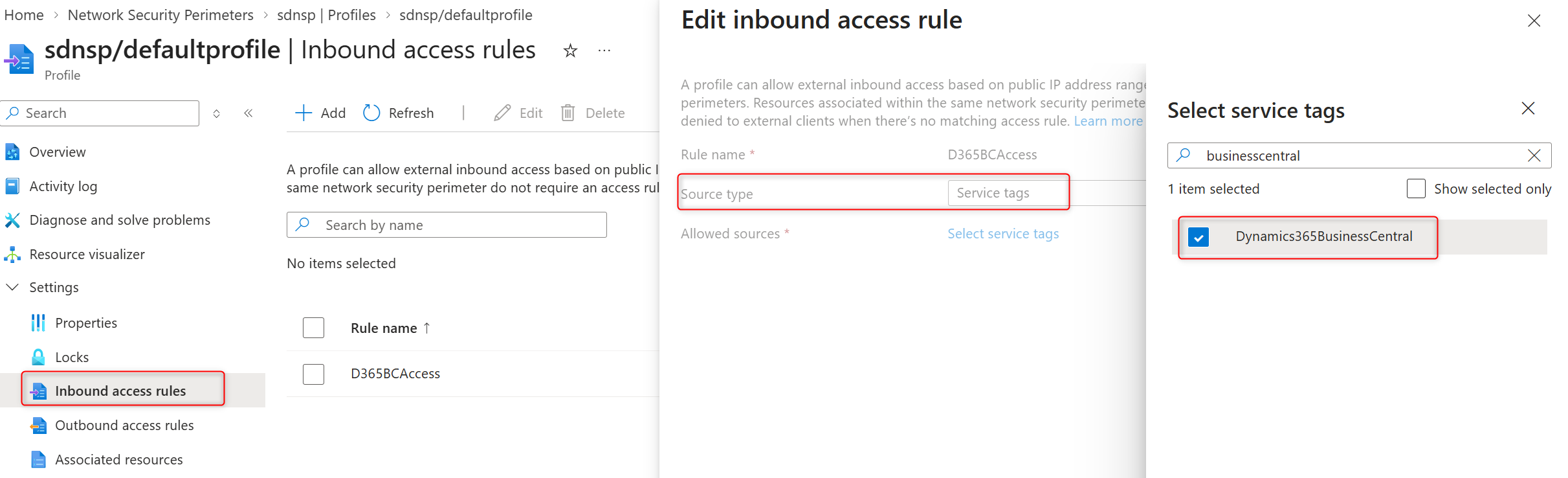
Microsoft automatically updates the IP address prefixes associated with a service tag..
Remember that Azure service tags are broad by design. A tag typically covers a wide set of IP prefixes and can include traffic from many Microsoft-owned service instances. Some of those are multi-tenant workloads that may run third-party or untrusted code. Allowing a tag means trusting the service as a whole, not just your own instance of it.
Before using tags, ask whether service-level trust is acceptable for your scenario. If you need stricter isolation, use more granular controls, such as specific IP ranges or subscription-based rules.


