

Microsoft has confirmed that both .NET 8 and .NET 9 reach end of support on November 10, 2026. After that date there are no more servicing updates, no security fixes and no technical support for either version.
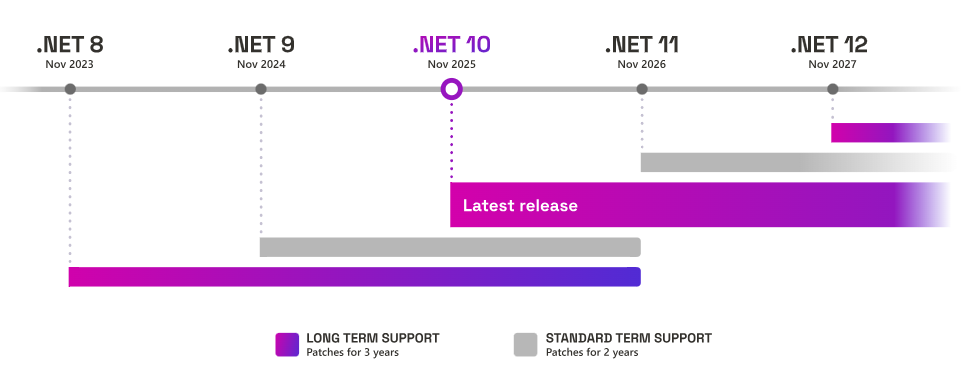
.NET 8 is an LTS release with a 36-month window. .NET 9 is an STS release, which now also gets 24 months instead of 18, so both versions end on the same day.
| Version | Release date | Release type | End of support |
|---|---|---|---|
| .NET 8 | November 14, 2023 | LTS | November 10, 2026 |
| .NET 9 | November 12, 2024 | STS (24 months) | November 10, 2026 |
| .NET 10 | November 11, 2025 | LTS | November 2028 |
Applications built on .NET 8 or .NET 9 keep running after that date. What stops is the flow of security patches, so any new runtime vulnerability stays unpatched for as long as you remain on that version.
What about Dynamics 365 Business Central?
For Dynamics 365 Business Central online the runtime is managed by Microsoft, so you don’t care about this problem.
The problem have instead an impact with the on-premises, installations. A Dynamics 365 Business Central 27 or 28 server installed from today’s packages keeps running after November 10, but on a runtime (.NET 8) that no longer receives security fixes.
The Dynamics 365 Business Central lifecycle dates and the .NET runtime requirements do not line up, and that is the whole issue for many.
- BC 28 (2026 release wave 1): on-premises support runs from April 1, 2026 to October 13, 2027, which is eleven months longer than .NET 8 support.
- BC 29 (2026 release wave 2): this release natively supports .NET 10 for both Business Central Server and the web server components. Moving to BC 29 resolves the runtime question.
- BC requirements today: the published page for version 28 also lists .NET 10, as does the page for version 27, while the pages for versions 25 and 26 still list .NET 8.
Microsoft is working on releasing updates for the versions that are still in regular support, so that they run on .NET 10. These updates are planned as cumulative updates, released once they are developed and adequately tested. The change is not trivial for the platform, and applying it on-premises may require extra installation steps.
The Microsoft documentation unfortunately is not so clear on saying exactly from which update Business Central 27 and 28 support .NET 10, but:
- the latest 28.6 update (October 2026) already targets .NET 10.
- the latest 27.12 update (October 2026) already targets .NET 10.
I’ve not checked if all previous CUs are also updated with .NET 10 support, but you can easily do that yourself if needed (check if the Prerequisite Components\DotNetCore package is the .NET 10.0.12 Windows Server Hosting installer).
I can agree that an upgrade is not always easy to schedule. Many on-premises customers freeze changes during year-end closing, which is exactly when the .NET 8 deadline falls.
Can .NET 10 run .NET 8 applications?
Technically yes, but not by default. An application built for net8.0 looks for a .NET 8 runtime. The default roll-forward policy only moves to a newer minor or patch version of the same major version, never to a different major one. With only .NET 10 installed, a .NET 8 app fails to start.
The behavior can be changed in the app’s runtimeconfig.json with this setting:
{
  "runtimeOptions": {
    "rollForward": "Major"
  }
}
The same effect is available through the DOTNET_ROLL_FORWARD=Major environment variable.
The other option is to keep both runtimes installed, since they run side by side, but then .NET 8 stays on the machine without security updates.
For Business Central this is not a fix. Forcing the server to roll forward is not a supported configuration, and the runtime is only one part of the story: Microsoft also has to validate the libraries, the IIS hosting and the dependencies the platform uses on .NET 10. That is a large part of why a supported move to .NET 10 has to come as an official update.
What can I do now?
- Check what your servers really run: run
dotnet --list-runtimeson the server and look at the runtimes installed by Setup. Open theruntimeconfig.jsonin the Business Central Server folder and in the web client folder to see which framework version they request. - Decide the path for each on-premises customer before November 10: either wait for the BC 28 cumulative update that supports .NET 10, or plan the major upgrade to BC 29.
- Book upgrades outside the year-end freeze: if a customer will not accept changes between October and February, agree the risk of staying on .NET 8 explicitly and put a date on it.
- Test your own .NET code against .NET 10: if you have integrations based on .NET versions older than 10, this is a good moment to uopdate them (they can run independently of the .NET version supported by the Business Central server).


