


YAMPI (the open source D365 Business Central Admin MCP Server I’ve released last year at Directions EMEA) lets AI assistants such as GitHub Copilot, Claude Desktop and Cursor performing advanced Business Central administration tasks through natural language.

Version 2.0 is the largest update since the first release: almost every part of the project has been revisited, from the tools exposed to the assistant to the way the server is built, tested, packaged and published.
Here is what changed, and why.
At a glance:
| Version 1.2.1 | Version 2.0.1 | |
| Admin Center API | v2.27 | v2.29 |
| MCP tools | 34 | 52 |
| Runtime | .NET 9 | .NET 10 (LTS), self-contained and trimmed |
| Platforms | Windows x64, Linux x64, macOS ARM64 | Windows, Linux and macOS on x64 and ARM64 |
| npm install size | ~115 MB (all binaries in one package) | ~14 MB (only the binary for your platform) |
| PTE deployment | Automation API | Admin Center API, with dependencies and scheduling |
| Sign-in | Cached in memory for the session | Kept across restarts in the encrypted OS token cache |
| Automated tests / CI | None | 103 tests, CI on Windows, Linux and macOS |
| Publishing | Manual npm publish | Tag-driven pipeline, npm trusted publishing (OIDC) with 2FA approval |
| Discovery | npm only | npm + official MCP Registry + one-click VS Code install |
What’s new for Business Central admins.
18 new tools (from 34 to 52):
- Environment lifecycle: rename_environment, restore_environment (point-in-time restore as a new environment), get_available_restore_periods, recover_environment (bring back a recently deleted environment), get_environment_operations and get_environment_quotas.
- Environment access: restrict an environment to a Microsoft Entra security group (get/set/clear_environment_security_group) and control access with Microsoft 365 licenses (get/set_access_with_m365_licenses).
- Database export: start_database_export exports an environment to a .bacpac in your Azure Storage account, and get_database_export_metrics shows how many exports are left this month.
- Sign-in control: force_interactive_auth opens the browser and lets you pick the account to use for a tenant, contributed by the community (more on this below).
Environment copy and create were also fixed to return the operation that Business Central starts, so the assistant can follow it.
PTE deployment through the Admin Center API:
Microsoft is removing PTE upload from the Automation API in 2027 release wave 1, so PTE management has been rebuilt on the Admin Center API v2.29:
- install_pte uploads a .app (up to 50 MB) and installs it immediately, in the update window, or at the next minor or major update.
- install_ptes_from_folder deploys a whole folder in dependency order, reading each package manifest (app.json or NavxManifest.xml) and validating everything before the first upload.
- Dependencies outside the folder, such as AppSource apps, are installed or updated automatically before the PTEs that need them.
- get_scheduled_pte_operations and cancel_scheduled_pte manage scheduled installs.
The previous Automation API tools are still there for environments that need them, marked as deprecated, and in 2.0.1 they finally report the real Business Central error when something fails.
Safer by default:
- Production confirmation: deleting or renaming a production environment, or uninstalling an app together with its data, requires the user to type the environment name. Clients that support MCP elicitation show a confirmation prompt, and a name supplied by the model is not accepted.
- Tool annotations: every tool declares whether it is read-only or destructive, so clients can run get_* tools without asking and warn before the dangerous ones.
- No tokens in the chat: get_microsoft_entra_id_token no longer returns the access token; it signs in and returns only the status and expiry, so the token never ends up in the conversation history.
Sign in once:
The server first uses credentials already on the machine (Azure CLI, Visual Studio, managed identity) and otherwise opens a browser login. The sign-in is now stored in the operating system’s encrypted token cache (Windows DPAPI, macOS Keychain, Linux keyring), so it survives restarts: you are asked to log in again only when the refresh token expires, not every session.
More reliable conversations:
- Clean MCP transport: all logs go to stderr and stdout carries only MCP messages. This fixes the “Unexpected token” errors some stdio clients such as Cursor reported. The log level is configurable with D365BC_MCP_LOG_LEVEL.
- Readable errors: when the Admin Center API rejects a call, the assistant receives the actual error code and message instead of a generic failure, so it can explain what went wrong.
- Throttling and transient errors: calls answered with 429 or 503 are retried, honouring Retry-After; read calls are also retried on gateway errors and timeouts, while write calls are never repeated.
- Cancellation and progress: long operations such as PTE deployments report progress and stop when you cancel the request in the client.
Under the hood
A cleaner architecture:
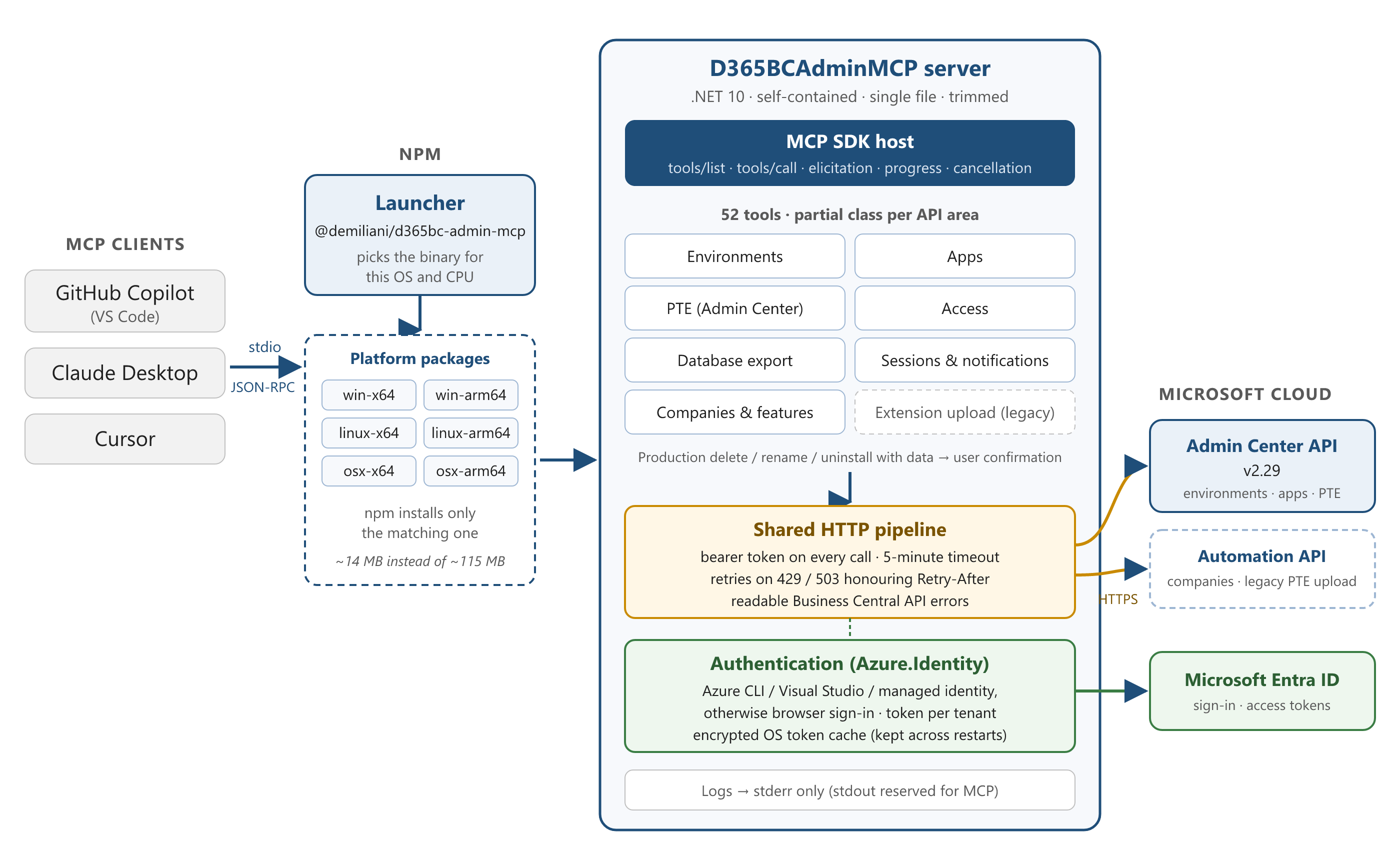
The original service was a single large class. In 2.0 it is a partial class split by API area (environments, apps, PTE, access, database export, sessions and notifications, companies and features), all sharing one HTTP pipeline that adds authentication, retries, timeouts and error translation in a single place. Unused serializer contexts and models were removed, and diagnostics go through a small logging component that writes to stderr only.
The npm package became a thin launcher: it locates the native server for the current platform and starts it with the standard input and output streams unchanged, so the MCP traffic flows directly between the client and the server.
.NET 10, self-contained and trimmed:
The server now targets .NET 10, the current long-term support release, with up-to-date Azure.Identity and Model Context Protocol SDK packages. Each binary is self-contained and single-file, so no .NET runtime is needed on the user’s machine, and trimmed, which brings the server from about 42 MB to about 16 MB.
One npm package per platform:
Version 1.2.1 shipped every binary in a single npm package of about 115 MB. Version 2.0 follows the pattern used by tools such as esbuild: a small main package plus one package per platform (Windows, Linux and macOS, each on x64 and ARM64). npm downloads only the one that matches your machine, so an install is roughly 8 times smaller, and ARM64 Windows and Linux plus Intel Macs are now supported.
Quality gates:
- 103 automated tests (xUnit) covering the tools, retries, cancellation, confirmations, PTE validation and authentication.
- CI on Windows, Linux and macOS for every pull request, with a code format check and an MCP smoke test that starts the real server and checks the protocol handshake and tool list.
- CodeQL security analysis, Dependabot for dependency updates, and a security policy with private vulnerability reporting.
A trustworthy release pipeline:
Releases are now produced entirely by GitHub Actions when a version tag is pushed:
- Each binary is built and smoke-tested on its own operating system and CPU, then the npm packages are installed exactly as a user would install them and tested again.
- Packages are published with npm trusted publishing (OIDC): no npm token is stored anywhere, and every package carries a provenance attestation linking it to the exact source commit and workflow run.
- Packages are only staged; they go live when a maintainer approves them on npmjs.com with two-factor authentication.
- The GitHub release includes the binaries, SHA-256 checksums and build provenance attestations that anyone can verify with gh attestation verify.
Listed in the official MCP Registry:
The server is published to the official MCP Registry as io.github.demiliani/d365bc-admin-mcp, automatically at every release. Clients that browse the registry can find and install it directly: in VS Code, search @mcp business central in the Extensions view. The README also offers an Install in VS Code button that configures the server in one click.
Thanks to the community!
This release closes all the open issues and includes the first external contribution: force_interactive_auth, proposed and implemented by pgarcia-orisha for users who need to sign in with a different account than the one cached on their machine. Thanks also to Dmitry who reported problems with PTE uploads and with the stdio transport in Cursor: your detailed reports made the fixes possible.
Breaking changes:
- get_microsoft_entra_id_token no longer returns the access token.
- Deleting or renaming a production environment, and uninstalling an app with its data from one, now require user confirmation.
- The server binary comes from a per-platform optional npm dependency: do not install with –omit=optional.
- Node.js 18 or later is required.
No tool has been renamed or removed, so existing prompts keep working.
How to upgrade?
Close your AI assistant (on Windows a running server keeps its executable locked), then run:
npm install -g @demiliani/d365bc-admin-mcp@latest
d365bc-admin-mcp –version
Your existing MCP configuration keeps working: the command is still d365bc-admin-mcp.


