

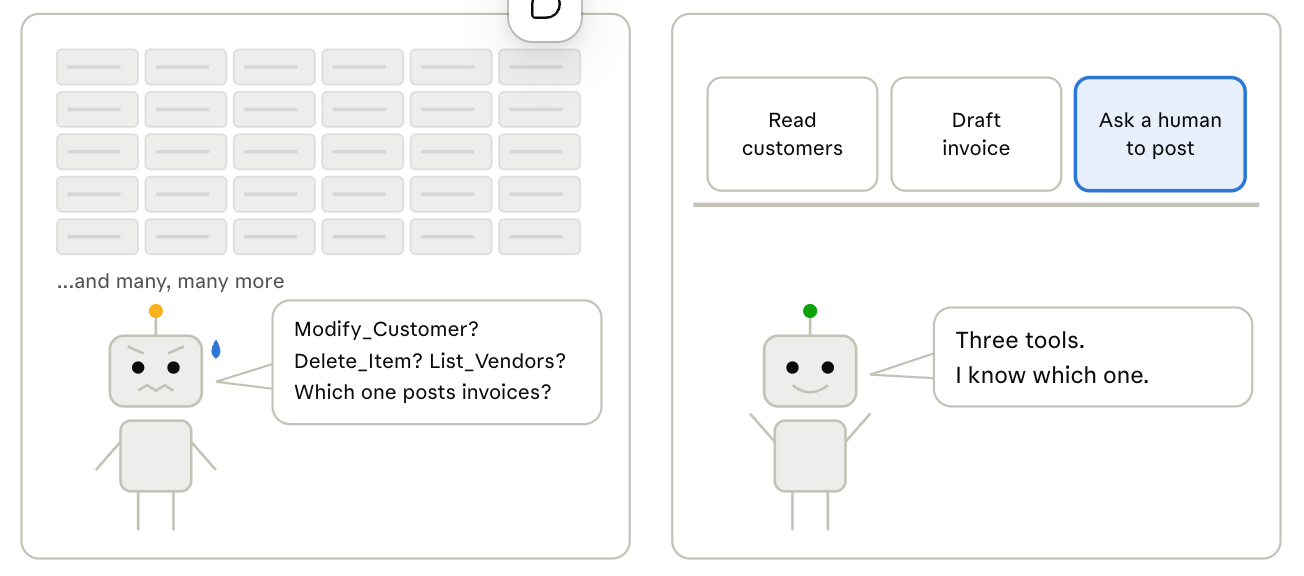
Model Context Protocol (MCP) makes it easy to turn REST APIs into tools that AI clients can discover, and that ease is the risk.
In this months I saw lots of Business Central tenants with MCP configuration turned on and with a lot of “doors opened” to AI agents.
A catalog of hundreds of loosely scoped tools is a security surface, and it is a confusion engine for the agent that has to choose among them.
A better prompt won’t fix this. Choosing your tools will. Treat the tool catalog like a shop’s shelves: nothing goes on them by default, and each tool must earn its place.
Dynamics 365 Business Central shows both sides of this in one product. Its MCP server lets you build a tight, hand-picked catalog for each agent. Its defaults do the opposite: with no setup at all, an agent can discover and read anything the signed-in user can see.
This post looks at both, and at the configuration choices that decide which one your agents get.
What the Dynamics 365 Business Central MCP server gives you.
The Dynamics 365 Business Central MCP server turns API pages and API queries into tools, and what an agent can do depends entirely on the named configuration it connects with.
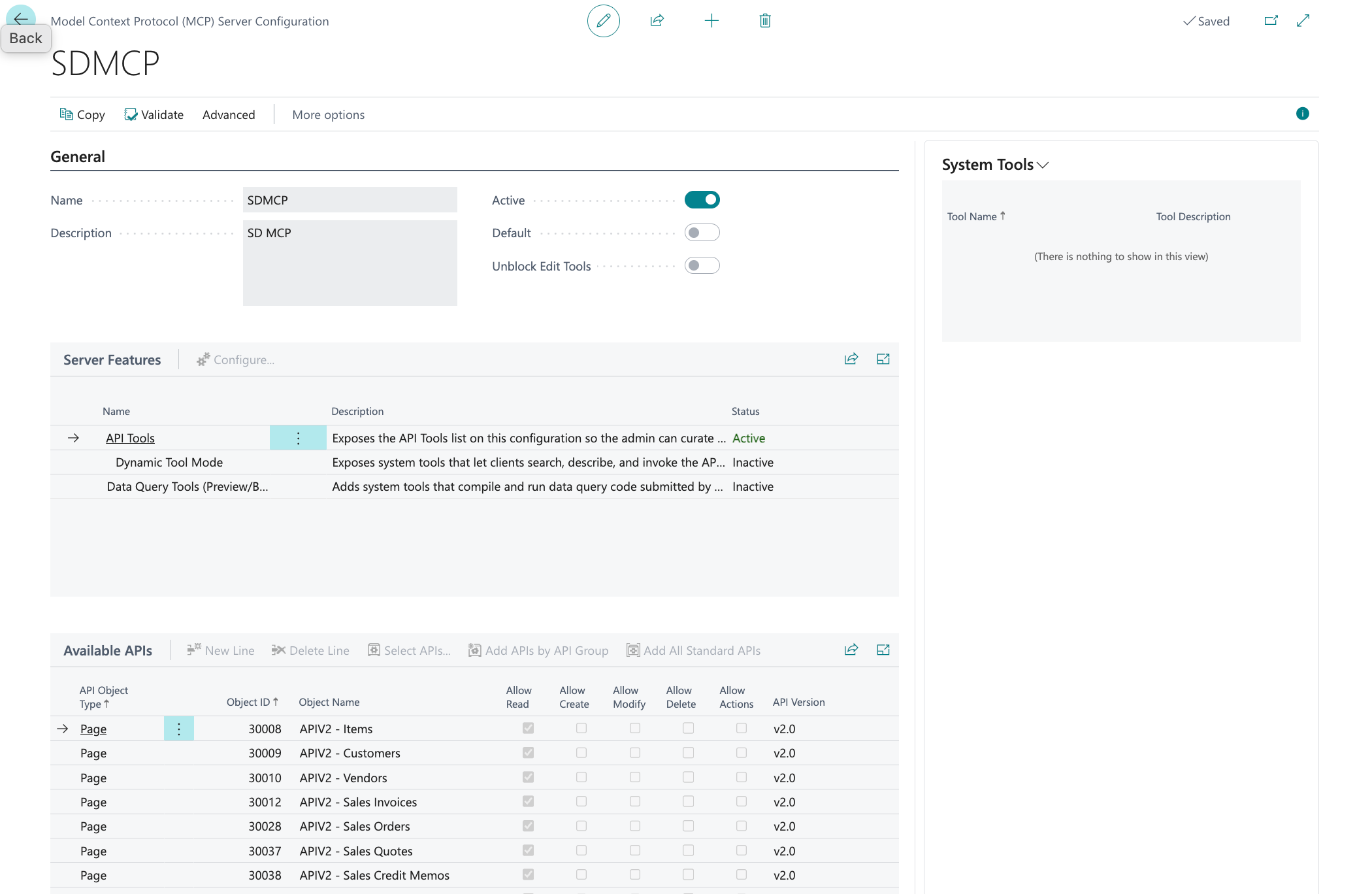
A configuration is an object in Dynamics 365 Business Central: you pick the server features, add the API objects, and set permissions per object.
| Server feature | What it does | Why it matters for curation |
|---|---|---|
| API tools | You select API pages and queries, then set Allow Read, Create, Modify, Delete and Actions per object | An explicit allowlist: the catalog is exactly what you put in it |
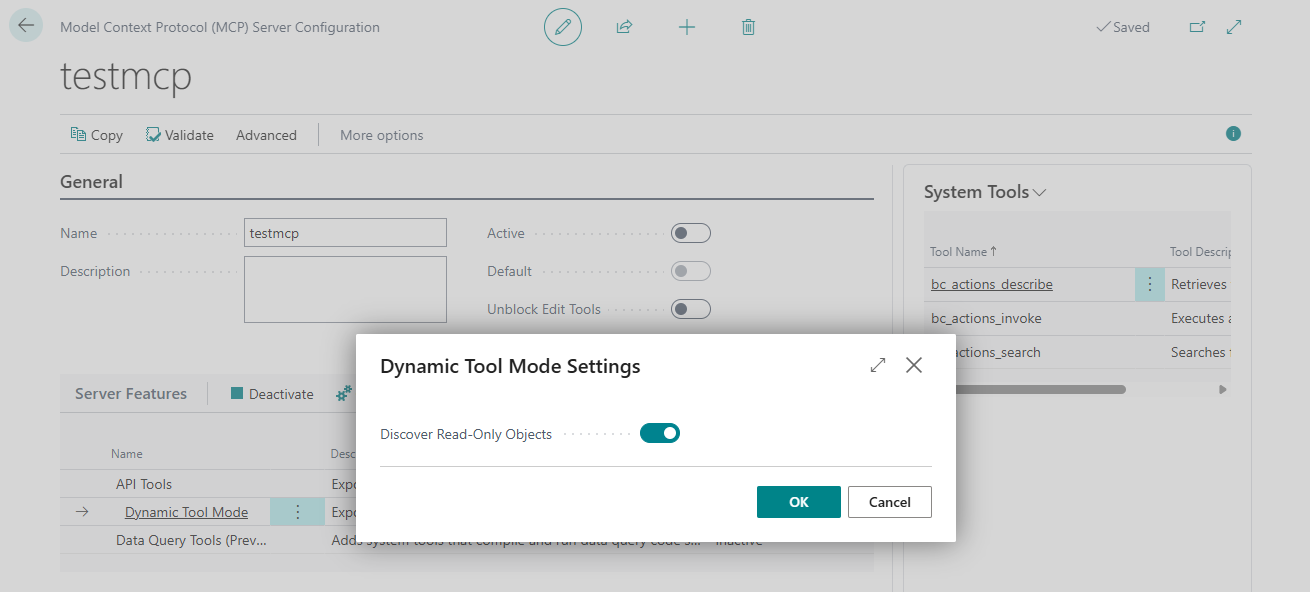
| Dynamic tool mode | Agents find and run tools at runtime through bc_actions_search, bc_actions_describe and bc_actions_invoke | Three tools replace one per operation, so you avoid client caps like Copilot Studio’s 70. The trade-off: agent makers can no longer choose which tools an agent gets, so the APIs listed in the Business Central configuration are the only filter. With Discover Read-Only Objects on, as in the built-in default, that means everything the user can read |
| Discover read-only objects | Agents can read eligible API pages and queries even if you never added them | The widest surface: limited only by what the signed-in user is permitted to read |
| Data query tools (preview) | bc_data_find_tables, bc_data_get_table_schema, bc_data_get_table_relations and bc_data_query, all read-only | Bypasses your API list entirely: the agent can query any table the user can read, with no business logic in between |
Three details matter before you design anything. First, the built-in default configuration has a blank name and is used whenever a connection does not specify a ConfigurationName. Out of the box it runs in dynamic tool mode with read-only discovery turned on, so agents can read whatever eligible APIs the user can reach, with no setup on your side.
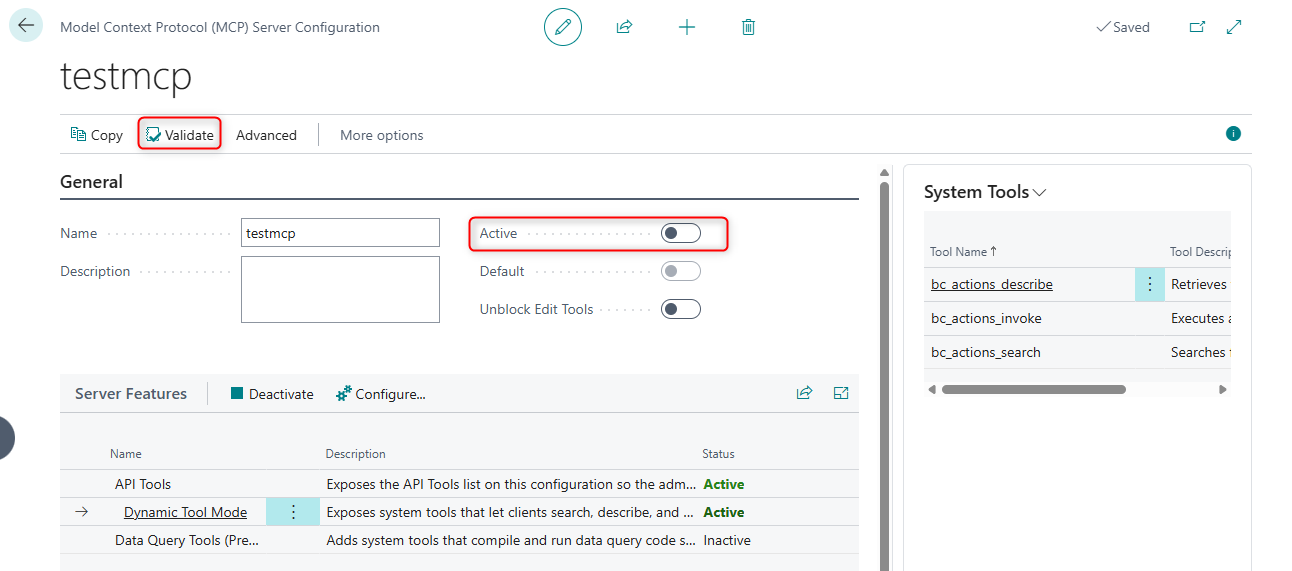
Second, writing is opt-in. To let an agent create, modify or delete data, or call actions such as posting, you need a configuration with Unblock Edit Tools turned on and the matching permission ticked on each object. An active configuration is locked until you deactivate it, and a Validate action checks it for problems before you activate it.
Third, check the Company header. It is the part of the connection that names which Dynamics 365 Business Central company the client works in. With it, the connection is locked to that one company. Without it, the connection is locked to none: the agent gets a list_companies tool, picks a company on every call through a company parameter, and API tools switch to dynamic tool mode even if you turned that mode off.
In practice, take an environment with three companies, Italy, USA and Germany. A user connects VS Code without Company and asks to compare overdue receivables across all companies. The agent lists the companies and runs the same query three times, one per company, in a single conversation. The only limits left are the configuration, which applies the same way in every company, and the user’s permissions in each company. If an agent should only ever touch one company, send the header or restrict the user to that company.
The MCP configuration is in short words the filter:
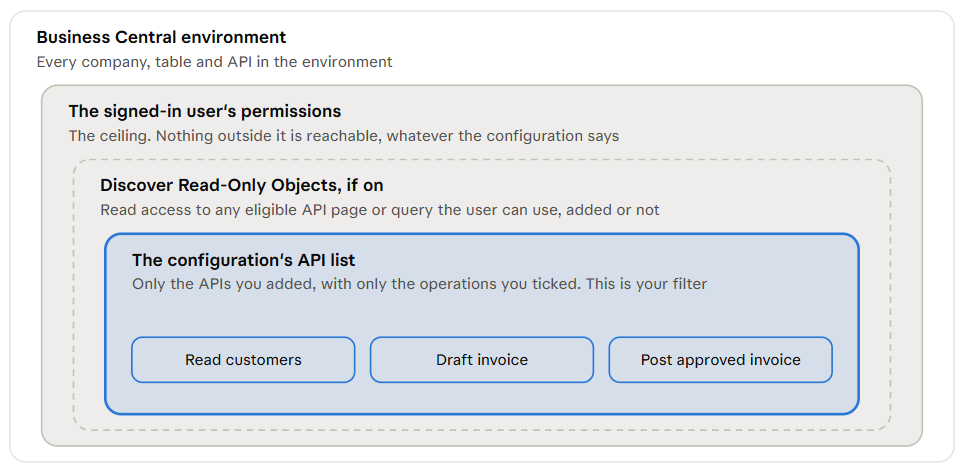
Each layer sits inside the one around it, and the agent works in the innermost one you allow. Data query tools are the exception: they read tables directly, anywhere under the user’s permissions, skipping the two inner layers.
Why a big catalog fails in an ERP?
It fails twice: once as a security surface, once as a confusion engine.
- Security surface: every tool is a capability, and the Add All Standard APIs shortcut adds the whole standard API v2.0 set in one click. Business Central permissions still apply, because the agent acts as the signed-in user, but that is a ceiling, not a design. An agent that runs as a power user inherits everything that user can do, including every write you ticked along the way.
- Confusion engine: tool names are generated from API metadata, so you get names like
List_Customers_PAG30009andModify_Customer_PAG30009. Hundreds of near-identical list, create and modify tools say what the data is, not when to use it. The model has to guess which one fits the business intent, and a wrong guess in an ERP is a wrong record.
The deeper problem is that API pages are table-shaped, not process-shaped. “Create a sales order” is a header, some lines and a posting action. Left to CRUD tools, the agent has to reconstruct that process on every run, and each extra call is another chance to get it wrong.
Dynamic tool mode softens the tool-count problem but does not remove it. It moves discovery to runtime, so the question changes from “which tools did we publish?” to “what can the agent find?”. With read-only discovery on, the answer is “anything the user can read”.
Microsoft has also announced plans to charge for Business Central MCP tools (pricing, the affected tools and the rollout are still to be published). The unit of work is already clear, though: the tool call, not the business outcome. In dynamic tool mode one action can take three calls (search, describe, invoke), and an agent hunting through a large catalog makes many more. A small catalog is cheaper as well as safer.
Treat the catalog like a product catalog.
A product catalog has an owner, a lifecycle and an entry bar. Nobody ships a product because it happened to exist in the warehouse. The same bar works for tools, and Business Central gives you the knobs to enforce it.
- Stable: pin the API version on each entry instead of following whatever is newest, and prefer published, versioned APIs over pages that shift with extensions.
- Owned: every tool has a named owner who maintains and tests it. In practice that means your own API pages and codeunits in your own extensions, grouped by API group, rather than a bulk import of the standard set.
- Well-scoped: one capability per entry, and only the operations it needs. API queries are read-only by design, which makes them the natural default for anything that only informs a decision.
- A business capability: expose “post this purchase invoice” or “check available stock“, not table access. A bound action or an API codeunit action carries the business rules with it, so the agent cannot skip validation by assembling the steps itself.
Open enrolment is the opposite: add everything, tick the boxes, let the model sort it out. It demos well and it is how a read-only assistant quietly becomes something that can delete customers.
How I would set it up?
I suggest to respect this rule: one configuration per agent job, not one configuration for everyone. A job can span several steps: an agent that drafts an invoice and posts it after approval is one job, with one configuration. A sketch of what that looks like (the entries are illustrative, not from a real tenant):
| Configuration | Job | Tools | Operations |
|---|---|---|---|
| SalesAssistant | Answer customer, item and order questions | Customers, items, sales orders | Read only, Unblock Edit Tools off |
| PurchaseInvoices | Turn supplier documents into invoices, posted only after approval | Vendors, purchase invoices, one custom posting action | Read vendors; read, create and modify invoices; post only through the custom action; no delete |
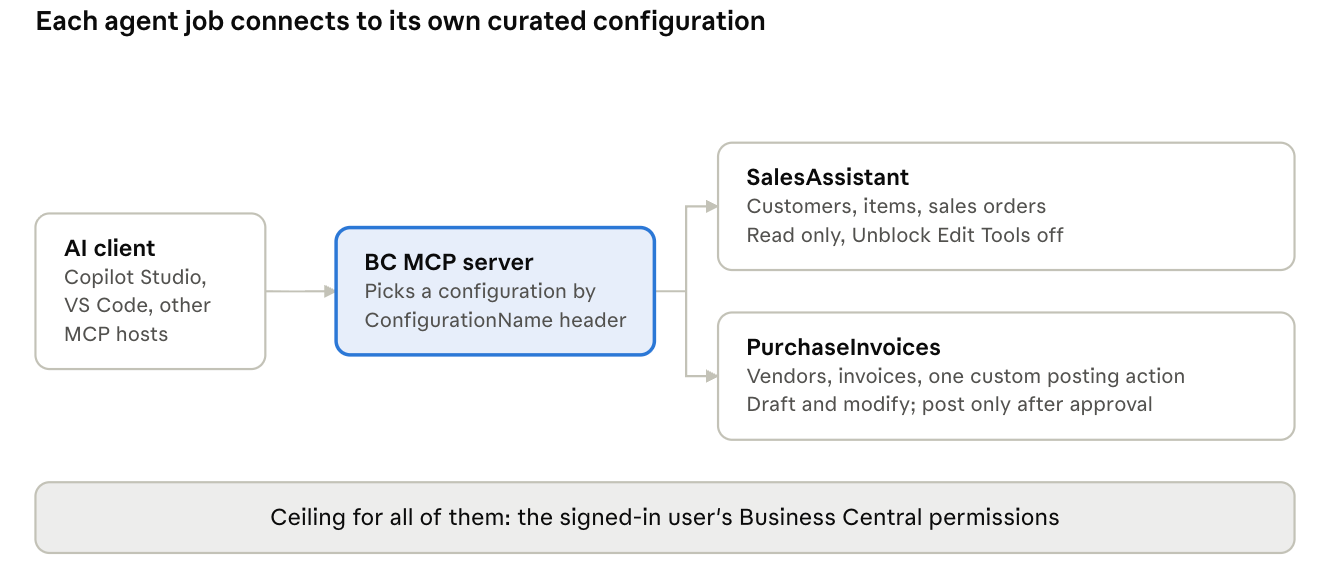
Each connection names one configuration, and every configuration stays under the signed-in user’s own permissions.
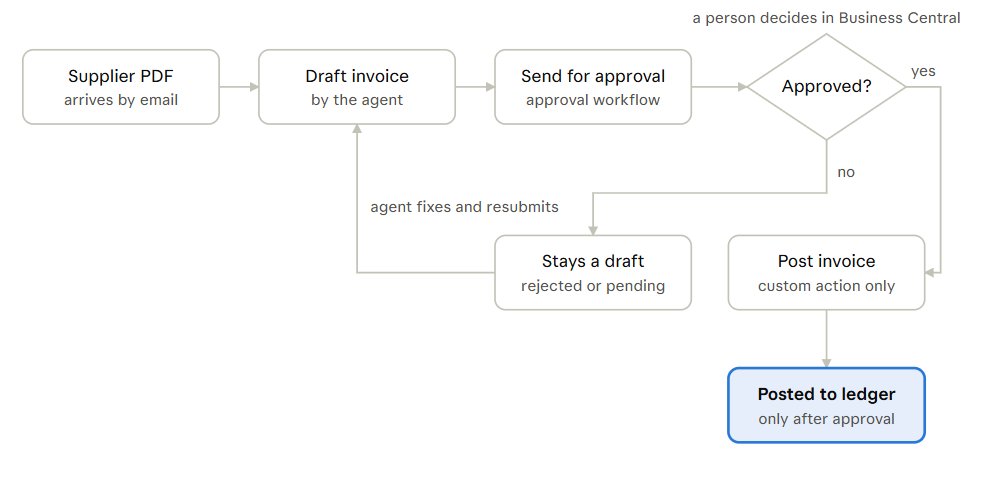
In the above example, PurchaseInvoices is the interesting configuration, because a single agent both prepares documents and posts them. The approval has to be a gate the model cannot get around, so it lives in Business Central, not in the prompt.
| API object | Read | Create | Modify | Delete | Actions |
|---|---|---|---|---|---|
| Vendors | ✓ | ||||
| Purchase invoices | ✓ | ✓ | ✓ | ||
| Custom API codeunit: post approved purchase invoice | ✓ |
- Post through your own action: Allow Actions on the standard purchase invoices page would expose every bound action on it, and the generic post checks nothing about your process. A small API codeunit, such as
PostApprovedPurchaseInvoice, checks that the invoice is approved, posts it, and refuses with a clear message otherwise. - Let Business Central own the approval: turn on a purchase invoice approval workflow. The agent drafts the invoice and sends it for approval; a person approves it in Business Central, Teams or email. Until then, the posting action refuses.
- Treat client confirmations as a bonus: some MCP hosts can ask the user before running a tool. That is a useful extra layer, but it depends on the client and is not a business approval.
The flow: the agent reads the supplier PDF, creates a draft, requests approval, a person approves, and only then does the custom action post it. One agent, one configuration, four tools.
NOTE: before you build a job like this, check whether Microsoft already ships it. The Payables Agent, Sales Order Agent and Expense Agent cover common processes out of the box, and the Payables Agent already handles incoming vendor invoices. Use MCP for what they do not cover: processes from your own extensions, cross-system scenarios and reporting.
The rules behind it:
- Replace the default. Designate a minimal named configuration as the default, so a connection that omits
ConfigurationNamelands somewhere safe instead of on the built-in read-only discovery. - Keep discovery off where agents write. Leave Discover Read-Only Objects off on any configuration with write tools, and turn it on only for a read-only assistant that genuinely needs breadth.
- Never tick delete by default. Add Allow Delete only with a written reason, and treat it as a review item.
- Give the agent its own identity. Run it as a dedicated user with a permission set sized to the job, so the ceiling is low even if the configuration is wrong.
- Keep a human in front of irreversible actions. Posting, deleting and anything that leaves the company should wait for approval.
- Validate and review. Run Validate before activating, and review each configuration like a release: what was added, who owns it, why it is there.
The same logic works at the Copilot Studio layer. Agent makers choose a configuration there, so naming it after the job (as above) makes the wrong choice harder.
Three ways to shrink the catalog:
One object, two configurations: take the standard Customers API page (30009). Ticking every permission produces four tools: List_Customers_PAG30009, Create_Customer_PAG30009, Modify_Customer_PAG30009 and Delete_Customer_PAG30009.
For a sales assistant that only answers questions, ticking Allow Read alone leaves one tool. That is three fewer tools, and no way to create or delete a customer by mistake.
Pointing a client at the curated catalog: the connection string you paste into the client’s MCP settings names the configuration. Leave ConfigurationName out and the client lands on the default instead.
"businesscentral": {
  "url": "https://mcp.businesscentral.dynamics.com",
  "type": "http",
  "headers": {
    "TenantId": "<your tenant id>",
    "EnvironmentName": "Production",
    "Company": "<your company>",
    "ConfigurationName": "SalesAssistant"
  }
}
Don’t let the agent assemble the process: take a common request: “turn this supplier PDF into a purchase invoice”. The same task plays out very differently depending on the catalog behind it:
- Open enrolment. The agent sees dozens of purchase-related tools. It creates a header, adds lines one call at a time, guesses at field names such as the vendor number or the item reference, and finds a post action sitting in the same list. One bad guess and a wrong invoice is posted to the ledger.
- Curated. The PurchaseDrafts configuration exposes vendors and purchase invoices and one custom posting action. The agent can draft and modify an invoice, but the only way to post is an action that refuses anything not yet approved in Business Central. A mistake stays in a draft that a person checks before anything reaches the ledger..
- Best: one action for the whole job: wrap the whole job in one custom API codeunit action, such as “create purchase invoice from document”, that validates the vendor, maps the lines and applies your rules in AL. The agent makes one call with clear inputs, and the business logic lives in code you test, not in the model’s reasoning.
Takeaway:
The Business Central MCP server gives you everything you need to curate: named configurations, per-object permissions, opt-in writes, and validation before activation.
The defaults point the other way. Out of the box, any user can connect an MCP client and read whatever their permissions allow, found at runtime rather than from a list anyone chose. A client that skips the Company header can move across companies too. Curation is a decision you make, not a setting you inherit.
Three ideas carry the whole post:
- The catalog is the security boundary: prompts and agent instructions can be ignored or injected; what a configuration does not expose cannot be called.
- Business capabilities beat table access: a posting action or an API codeunit carries Business Central’s rules with it. A chain of create and modify calls on raw entities does not.
- Small catalogs make better agents: fewer, clearer tools mean fewer wrong choices, and in an ERP a wrong choice is a wrong record.
Before you publish a tool, ask four questions. If any answer is no, it stays out of the catalog:
- Is it stable? A pinned API version on a published interface, not a page that changes with every extension.
- Does someone own it? A named person who maintains it, tests it and answers for it.
- Is it scoped? One capability, with the fewest operations the job needs.
- Is it a business capability? It should do a job a business user would name, such as “create an invoice from a supplier document”, not just expose a table. A generic
Modify_PurchaseInvoice_PAG<ID>leaves the model to work out the process; a custom API codeunit action built for the job carries the process, and the rules, with it.
And before your first agent goes live, check your Dynamics 365 Business Central environment:
- A minimal named configuration is set as the default, replacing the built-in read-only discovery.
- Each agent job has its own configuration, named after the job.
- Allow Delete and Allow Actions are ticked only with a written reason.
- Clients send the
Companyheader, or the user is limited to the companies the agent should touch. - The agent runs as a dedicated user with a permission set sized to its job.
- Posting and other irreversible actions wait for human approval.
- Every configuration passed Validate and has an owner.
An agent is only as safe as the catalog it can see. Keep yours small enough that you can explain every entry in it.


