

Everyone is talking about building AI applications. Pick an LLM, send it a prompt, get a response. Ship it. Iterate. Move fast and break things.
This works wonderfully for hackathons, demos and weekend projects. But it does not work for your real-world customers.
The statistics I saw in the last year are different than an idyllic world: around 60/70% of enterprise AI projects fail. Only around 5% of AI pilot programs achieve rapid revenue acceleration. The average organization scrapped around 40% of AI proof-of-concepts before they reached production.
AI for business is not vibe coding…
Everyone talks about and celebrates “vibe coding”: building AI applications with remarkable speed using tools like GitHub Copilot, Claude, Codex and more. Anyone can now build something that feels intelligent. Everyone talks about rules for vibe coding, new tools, best practices, N coding agents to increase the vibe coding experience. All good and exciting (I’m a fan of this too), but this is not what customers want (and we’re honestly quite tired of always talk about those stuffs nowadays 🤭).
In the enterprise, AI is categorically different.
When a customer asks you to build an AI agent for their business, they are not asking for a toy. They are asking for a system that:
- Respects their data governance policies and security boundaries.
- Integrates with existing systems that predate modern cloud architecture.
- Handles edge cases, exceptions, and domain-specific logic that no prompt can address.
- Operates reliably at scale, not as a prototype that works once.
- Logs decisions, maintains audit trails, and supports compliance requirements.
- Behaves consistently even when the LLM’s behavior drifts.
Vibe coding ignores all of this. It assumes a stable environment, predictable behavior, and the luxury of rebuilding when something breaks. Enterprise AI assumes none of these things.
What customers actually want (and the ecosystem largely ignores).
Customers do not want vibe coding. They want:
- Business impact, not technical novelty. They care about ROI, not about using the latest fancy AI tools. Does this AI system make them money, save them time, or reduce risk? If not, it does not matter how clever the implementation is.
- Operational reliability. A system that works perfectly 90% of the time is not acceptable. They need systems that work correctly, every time, or fail visibly with clear error messages, not silently produce wrong answers.
- Integration with their reality. Their systems are messy. Their data is fragmented. Their workflows are adapted to decades of accumulated constraints. They need AI that fits into this reality, not AI that requires them to rebuild everything first.
- Governance and control. They need to understand what the system is doing, why it made a decision, and be able to audit it. They need to enforce business rules. They need to know where the lines are between what the AI decides and what humans decide.
- Sustainable cost models. Vibe coding that burns through expensive API calls without discipline is not sustainable. They need thoughtful architecture that minimizes waste.
- Team capability building, not outsourced magic. They want to understand how the system works so their teams can maintain and evolve it. They do not want to be perpetually dependent on external experts.
None of these aspects generates the viral engagement of a social post about the latest vibe coding features and capabilities. But all of it is what actually matters to customers.
The gap between what the AI ecosystem talks about and what customers need is widening. The ecosystem has become a feedback loop of tools for tools, frameworks for frameworks, optimization of the demo. Meanwhile, customers are sitting with real problems that require something the ecosystem largely ignores: reliable, integrated, governance-aware enterprise AI.
Real-world AI is much more than some HTTP calls to LLMs.
I wrote this provocative sentence some weeks ago on LinkedIn and it generates quite a lot of discussions.
The simplest mental model for AI is a function: input goes in, the LLM processes it, output comes back. This is how most demos work. This is not how business systems work.
A real-world AI agent in an enterprise context typically needs to:
- Retrieve context from multiple databases and systems before forming a request.
- Make decisions that depend on factors the LLM shouldn’t decide alone (business rules, thresholds, governance).
- Execute actions across multiple systems (ERP, CRM, document repositories, external systems).
- Handle failures gracefully when downstream systems are slow, unavailable, or return unexpected data.
- Validate outputs against domain constraints before committing them to production.
- Maintain state across multiple turns of interaction and multiple invocations.
The LLM is one piece of a much larger puzzle. It is a powerful reasoning engine, but it is not the system itself. The system is the orchestration around it.
The big mistake I often see is treating the LLM as the solution. In reality, the LLM is a component. The solution is the architecture that puts that component to work reliably within constraints, policies, and integration points that matter to the customer. Building an enterprise AI system requires orchestrating multiple services.
Consider a realistic scenario: an AI assistant that helps a customer service team handle complex inquiries related to orders, inventory, and shipping.
The workflow might look like:
- Customer inquiry comes in via a chat interface or email
- The system retrieves customer context from Business Central (order history, credit limit, account status)
- The system queries inventory data from Business Central to understand stock levels and locations
- The system checks shipping availability and costs from a third-party logistics API (e.g., FedEx, DHL, or a carrier integration platform)
- The system queries the knowledge base or document repository (SharePoint, Confluence) for product specs and policies
- The LLM synthesizes all this context to generate an informed response and recommend actions
- If the inquiry requires action (hold inventory, create a service order, book shipping), the system updates Business Central records and potentially triggers a workflow in Power Automate
- The system logs the interaction for audit, compliance, and training purposes
This realistic flow requires integration with:
- Business Central (via OData API) for customer, order, and inventory data.
- Logistics APIs (FedEx, DHL, or other carrier management platform) for shipping availability and rates.
- SharePoint or Document Repository for product specifications, policies, and knowledge base content.
- An LLM service (OpenAI, Azure OpenAI, or similar) for reasoning and response generation.
- Power Automate or Azure Logic Apps to trigger downstream workflows (approval requests, order creation, etc.).
- A chat platform or UI layer (Teams, custom web interface) to handle user interactions.
- An Application Insights or logging system for monitoring, audit trails, and compliance.
- Potentially Azure Cognitive Search or similar for semantic search over the knowledge base.
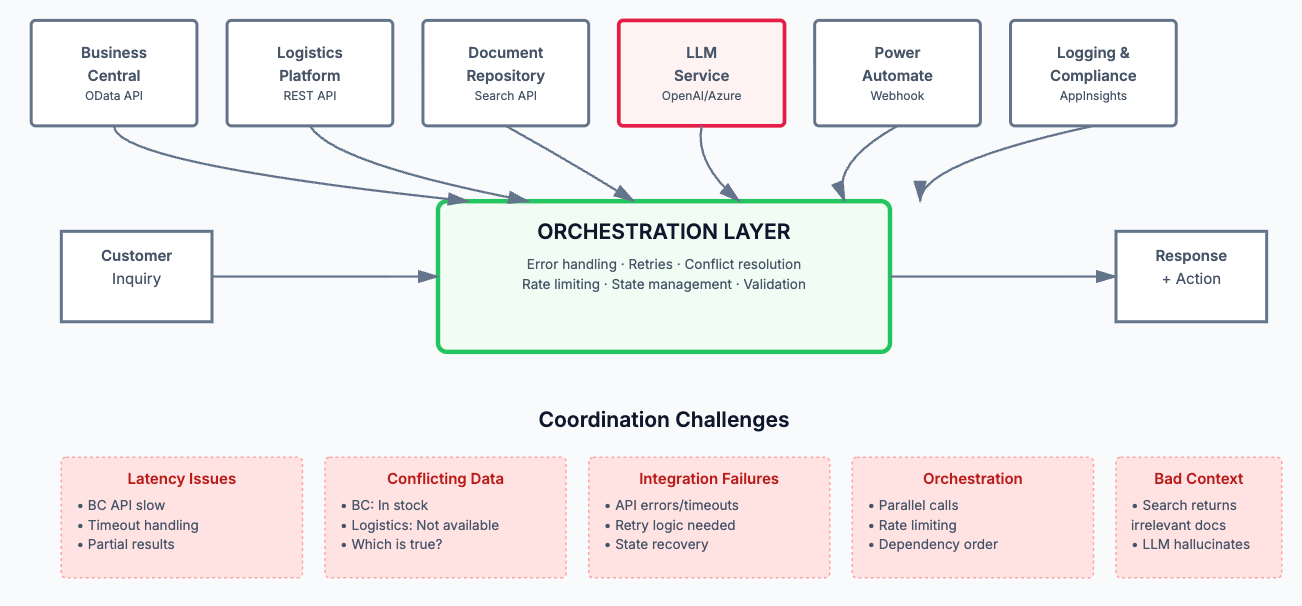
Each integration has its own failure modes, latency characteristics, quota limits, authentication requirements, and data format expectations. Some are synchronous, others support webhooks. Some are rate-limited, others have per-request costs. Some require retry logic, others don’t tolerate duplicate calls. The system must handle all of them gracefully, in parallel, and without losing state.
- What happens if the Business Central OData API is slow (it can be)? Do you timeout? Retry? Show a partial result?
- What if the logistics API returns an error? Do you let the LLM know? How do you handle it gracefully?
- What if the knowledge base search returns irrelevant results? The LLM might hallucinate based on bad context.
- What if two systems return conflicting information (Business Central says item is in stock, but logistics API says it’s not available for shipping)?
- What if the LLM decides to take an action, but the Power Automate/Logic Apps workflow fails midway? Can you rollback?
In enterprise AI systems, the orchestration layer (the logic that coordinates services, handles errors, manages state, manages rate limits, reconciles conflicting data, and enforces business rules) often contains more value and complexity than the LLM integration itself. It is the core of your architecture, so treat it as such.
Another problem I often see is the following: an AI workflow can take minutes, hours, or even days to complete, far too long for a synchronous HTTP request. The client cannot hold a connection open. The process must survive system restarts, network failures, and manual intervention.
Enterprise-grade AI systems should use asynchronous patterns:
- Request arrives → The system immediately acknowledges it and returns a tracking ID.
- Work begins in the background → The workflow progresses through stages, potentially involving human decision points.
- State is durably persisted → Each step’s result is stored so the workflow can resume even if the system crashes.
- Client polls or receives notifications → The requester learns about progress via webhooks, polling, or a dedicated status endpoint.
- Final result is available → When complete, the result is stored and accessible.
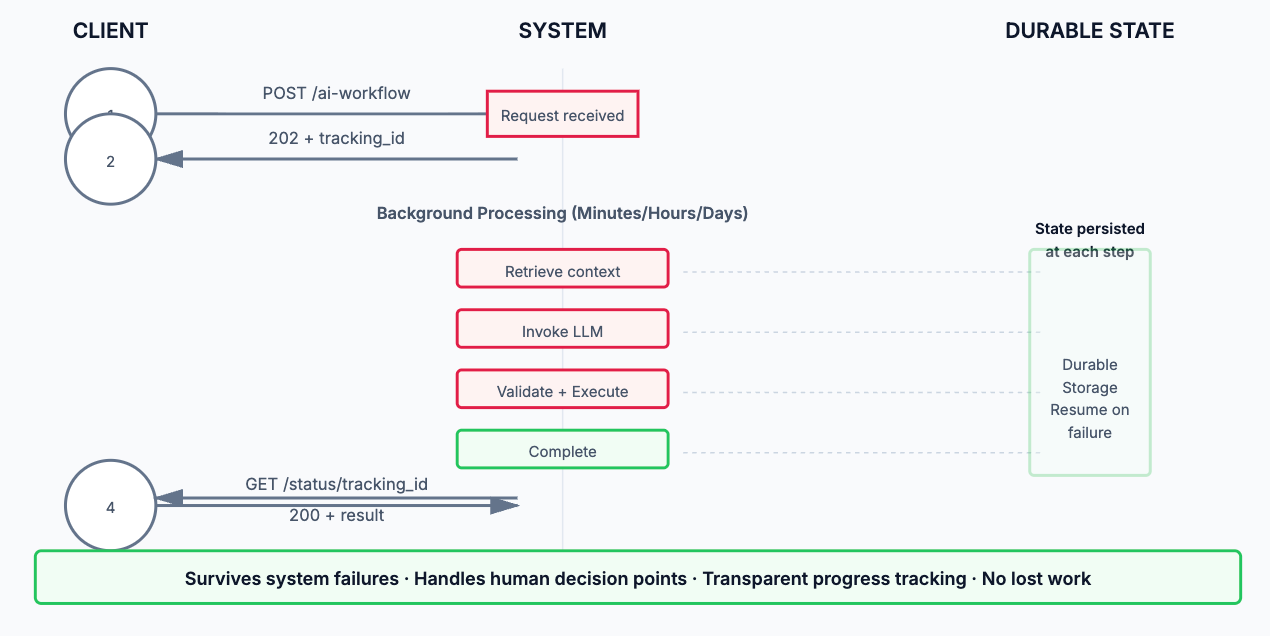
This pattern requires infrastructure that can handle persistence, retries, and scheduling. Cloud services are almost essential here, like for example:
- Azure Durable Functions / Azure Logic Apps for workflow orchestration.
- Azure Functions for complex logic.
- Azure Service Bus for reliable messaging.
- Cosmos DB, SQL Database, or similar for durable state storage.
These are not optional luxuries. They are foundational requirements for systems that need to survive failure and handle workloads that exceed the limitations of synchronous request-response patterns.
Designing an agent architecture for a real-world business process is complex and requires different choices.
Agents need access to tools—functions they can call to interact with the business system. These might include:
- Querying inventory in Business Central
- Fetching customer payment history
- Creating service orders or change requests
- Accessing external APIs for pricing, shipping, or compliance data
The LLM decides which tools to use and when. The orchestration layer ensures the tools behave correctly and handle errors. This division of responsibility is critical: the LLM reasons, but it does not execute directly. Execution is controlled and validated.
Agents need guardrails (constraints that prevent them from making dangerous decisions). Examples:
- Never approve payments above a certain threshold without human review
- Never delete records; only mark them as inactive
- Never commit to delivery dates that violate supply chain constraints
These rules are not expressed in the prompt. They are enforced by the orchestration layer. The agent can request an action, but execution only proceeds if the action passes validation.
Complex tasks require agents to reason across multiple steps, potentially asking for clarification or human input. An agent building a sales proposal might:
- Ask clarifying questions about the customer’s needs
- Query pricing and availability data
- Generate draft terms
- Request human review for complex terms
- Finalize and present the proposal
This requires state management, context preservation, and graceful handling of human interaction points. As you can see, it is far more complex than a single LLM call.
Business Central is a powerful ERP system, but it is not designed as an AI-native platform for everything. Integrating AI agents with Business Central introduces specific challenges that often requires to use also external tools and planning the architecture of the solution accordingly.
Some organizations look at Business Central’s built-in AI features or Copilot Studio and assume those tools are sufficient for building enterprise AI agents. They are not. Not for meaningful business transformation.
Built-in AI features in Business Central are designed for simple, isolated tasks. They work within the boundaries of Business Central’s data model and cannot easily orchestrate workflows that span multiple systems.
Copilot Studio is more flexible, it allows you to build conversational agents and wire them to connectors. But at its core, it is a low-code platform optimized for rapid prototyping and demo-ready solutions. It is not built for:
- Complex orchestration logic across multiple systems with sophisticated error handling, retry policies, and state management.
- Long-running asynchronous workflows that need to survive system restarts, span days or weeks, and involve human decision points.
- Durable state persistence that survives failures and allows resumption from any point in a workflow.
- Fine-grained governance and guardrails that enforce business rules at every step with full auditability.
- Performance optimization at enterprise scale (parallel API calls, intelligent caching, request deduplication, rate limit management).
- Seamless integration with legacy systems, custom business logic, and specialized domain models.
- Production operations (monitoring, alerting, debugging, version management, and disaster recovery).
Copilot Studio can be a component of your solution (a UI layer, perhaps, or a proof-of-concept starting point). But treating it as your AI architecture is like building a skyscraper with a prefab shed. It works for the walls, but the structural system needs to be engineered separately.
So why many AI projects fail?
Here is the hard truth (at least in my opinion) about why so many customer’s AI projects fall short of expectations: many organizations take an existing workflow they have in place and put some AI on top of it. They automate one step, maybe two. But the fundamental processes, roles, dependencies, controls, bottlenecks and overall work logic remain intact.
Real transformation does not occur when we ask AI to do an existing task better. It occurs when we ask whether that task should exist in that form at all. It occurs when we stop thinking about automating individual activities and start thinking about redesigning workflows.
This is IMO why so many initiatives fail or stall at modest results: it is far easier to buy software than to fundamentally restructure culture, accountability, organizational interfaces, and processes that have been refined over years.
The wrong question is: Where can we put AI?
The right question is: Which parts of our work need to be fundamentally redesigned so that AI actually matters?
This is not a semantic difference. It is a strategic difference. In the first case, you are adding a technology layer. In the second, you are redesigning an operating system. Customers who ask the right question are the ones who see transformational results. Customers who ask the first question tend to see only modest and localized improvements.
What about needed partner’s skills to propose AI?
This is a topic where I personally fight with many (internally in my company and externally with partners). Everyone now is an expert on AI just because there are some agents in Business Central or there’s Copilot Studio or there’s the vibe coding option to create something.
But building business AI agents that deliver real value requires developer-oriented skills and technical depth. This is not low-code work. This is engineering.
No-code and low-code platforms lower the barrier to entry for simple, isolated AI use cases. They do not eliminate the need for serious engineering when the stakes are high, the scope is broad, and the complexity is real.
I think that if you are a systems integrator, partner, or consultant proposing AI solutions to customers, you need capabilities that go far beyond knowing how to call an LLM.
First of all, you need to understand how distributed systems work: service orchestration, async patterns, state management, failure modes, and scalability constraints. This is not a “nice to have”, it is foundational. Vibe coding does not scale to enterprise workloads.
Then, you need to help customers ask the right questions about their workflows. This is not a technical work, but it is more a strategic and organizational one. You are helping them see where AI can enable fundamentally different ways of working, not just faster execution of existing processes. This requires:
- Change management experience to help organizations actually adopt new ways of working
- Facilitation skills to engage stakeholders and surface constraints
- Process mapping and analysis
Building enterprise AI systems requires solid cloud infrastructure and services knowledge: Azure Functions, Logic Apps, Service Bus, SQL Database, application monitoring, and logging. You need to understand:
- How to design for resilience and failure.
- How to monitor and diagnose production issues.
- How to manage costs at scale.
- How to enforce security and compliance policies.
Yes, you also need to understand LLMs: their strengths, limitations, failure modes, and how to prompt them effectively. But this knowledge is only valuable in context. You need to know:
- When an LLM is the right tool and when it is not.
- How to manage hallucinations and inconsistency.
- How to structure prompts around your domain and constraints.
- How to evaluate model choices based on your use case.
This is harder than reading the latest LLM paper. It is about applying LLM knowledge to real business constraints.
Developing these skills takes time and real projects. It is not something you can absorb from online courses alone. You need to build real systems, fail at them, learn from failures, and refine your understanding. This is the barrier to entry for credible AI partners (and why so few exist who can execute at this level).
Oh, I want also to mention here a last topic that I think it’s really important: do honest conversation about AI limitations with your customers. Tell customers what AI cannot do. Can you protect your customer’s budget from an overhyped, scope-creeping project that promises 90% automation when 40% is realistic? Can you push back on unrealistic timelines? Can you clearly articulate the risks and effort involved?
Partners who do this earn customer trust and deliver sustainable results. Partners who don’t eventually deliver disappointing projects and damaged relationships.
Conclusion: the path forward.
Customer AI projects fail not because AI is overhyped or because the technology doesn’t work (it does). They fail because the gap between vibe coding and enterprise AI is enormous and most organizations, partners, and customers underestimate it.
They fail because adding a conversational layer on top of existing processes is not the same as transforming how work gets done.
They fail because building a reliable, scalable, integrated AI agent requires architecture, domain knowledge, process redesign, cloud infrastructure, and honest problem-solving that goes far beyond knowing how to send a prompt to an LLM or just using tonly he standard AI features that you have inside a platform like your favourite ERP .
If you are serious about AI for your customers, ask the right questions. Not “where can we put AI?” but “what should we fundamentally reimagine?” Not “can we build this quickly?” but “can we build this sustainably?” Not “how do we add a chatbot?” but “how do we redesign this workflow so that human intelligence and machine intelligence complement each other?“
The organizations that ask these questions and commit to the work will see transformational results. The others will see expensive pilots that deliver modest improvements and slowly fade away.
The choice is yours. So is the responsibility for making it honestly.


Very good summary, highlighting the hype vs reality. It is good to use AI tools in your project to get things done quicker. But you always needs to look at the results it has produced with a pinch of salt. It needs human validation and adjustment to reproduce ready. This is where your years of Business Central product knowledge and experience comes in. Which is vital.
Just to share, in one of my performance tuning work, I have asked to re implement a piece of SQL code as AL code, as customer is gearing for a SaaS migration. Just to test these AI agents, I have presented the SQL code and asked it to convert to AL code. It have given me the AL code in no time. But but it is not 100%. It could see, it can fail in the frienches. Most importantly, it is not performance optimised for AL as we quite often need to do thinks differently in AL compaired to SQL, see my blog by visiting https://www.sqlmantratools.com/blog-post . I have to adjust the AL code produced by the AI agent to be production ready.
In summary, It definitely, saved my time compaired to writing the code from scratch. But I will never put it into production, blindly, with out a review.
LikeLike