

Dynamics 365 Business Central 2024 Wave 1 release (version 24) is out now and you should be aware of some important hidden changes on the server runtime.
The first important change is that now Dynamics 365 Business Central server runs on .NET 8.
.NET 8 is not only the newest but also the fastest .NET version available at the moment, with lots of performance optimizations on handling memory allocations and garbage collector, handling collections and data operations, handling exceptions. I’ve personally done some benchmarks when .NET 8 was released and on custom applications I saw a 30% performance improvement over .NET 7.
Together with the new .NET 8 runtime, also a change in the server management is coming. With Dynamics 365 Business Central 2024 Wave 1 release, Microsoft is moving the management shell to Powershell 7.
The Windows Powershell cmdlets for managing Dynamis 365 Business Central server on-premise now requires Powershell 7. When you import the Business Central Powershell administration tool with the following command:
Import-Module -name <path to navadmintool.ps1>
Powershell 7 will be used by default to start the tool and it will load the new Microsoft.BusinessCentral.Management.dll files.
In order to temporary support this change, Microsoft is also providing a backward compatibility bridge with Powershell 5 that, when used, it will load the (now deprecated) Microsoft.Dynamics.Nav.Management.dll files, that in turns will load the new tool.
A diagram showing how the new Powershell administration tool works is represented in the following diagram:
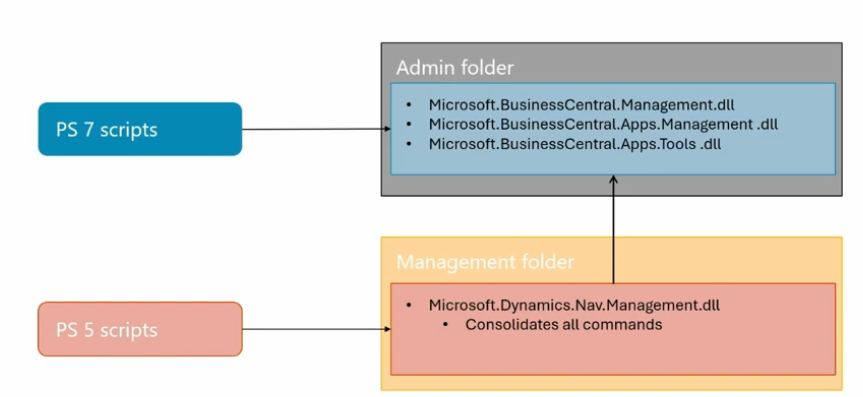
When you import NavAdminTool.ps1 file, now the tool will be able to use Powershell 5 (and the bridge) or Powershell 7 accordingly to the Powershell version that you have installed.
Please remember that the compatiblity bridge will be soon deprecated in future releases, so it’s recommended to start using Powershell 7.4 as soon as possible.
Be aware that this change can also affect using BCContainerHelper with Docker. In order to avoid problems on loading modules, it’s recommended to upgrade BCContainerHelper to the latest version.
Hidden changes, but probably something important to remember in order to avoid disruptions.


i have a machine with v23 where i just installed v24. There is a problem with powershell. You cannot create a WebServer for v24. It automatically uses the v23 scripts/modules of powershell. Even if you load v24 modules manually. I’m the only one experiencing this issue?
LikeLike