


Yesterday I was talking with a partner that developed an extension with a quite complex logic declared in a codeunit with visibility = Internal (so the object can be accessed only by code in the same module, but not from another module). Now they have created a new extension (dependent from the previous) and they would like to reuse the business logic declared on the main extension in this new app. They have changed the access level of the codeunit in the main app but doing this they had immediately a blocking problem: they don’t want to expose all their methods to the external world!
How can achieve this result? The solution is: use the (quite hidden) internalsVisibleTo property.
This property permits you to specify a list of modules that have access to the objects that are marked as Internal using the Access property from the current module.
How can we use that?
As an example, here I’ve created an app A with a codeunit (called Task Management) declared as Internal. In this codeunit I have a public procedure, a local procedure and an internal event:
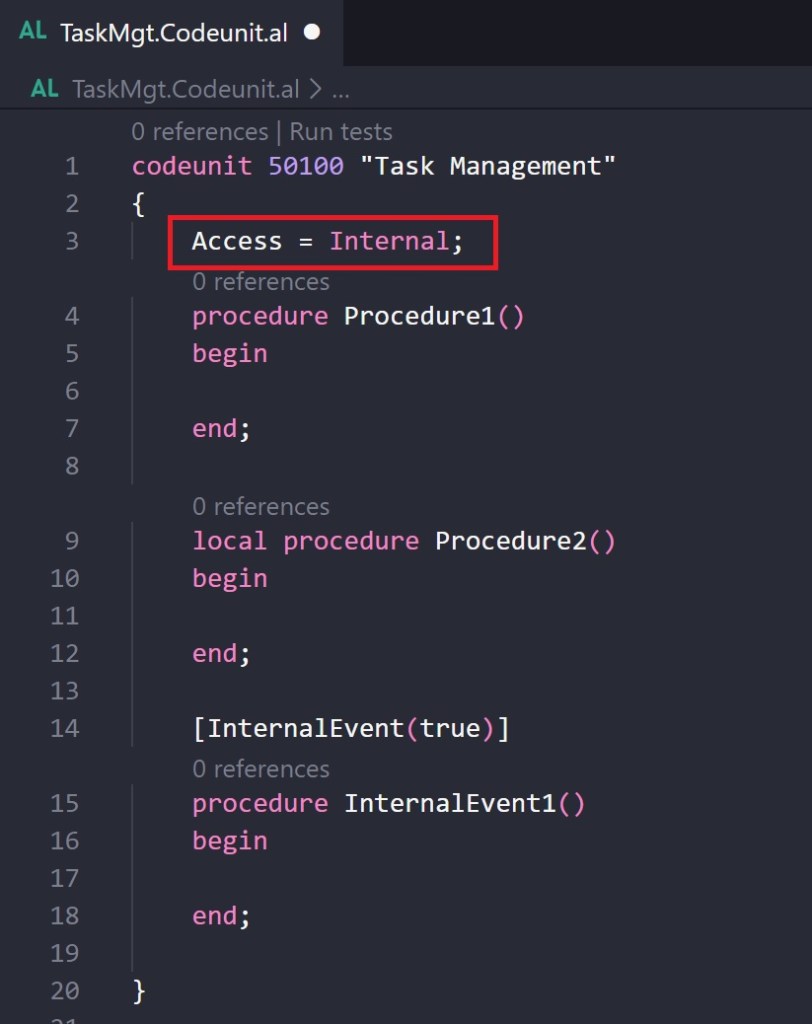
This means that this codeunit can be used only internally to extension A and the internal event can be subscribed only internally in extension A.
Now I create an extension B that depends from A and on this extension I want to use the Task Management codeunit declared on A. If I try to reference the codeunit, this is obviously the result:
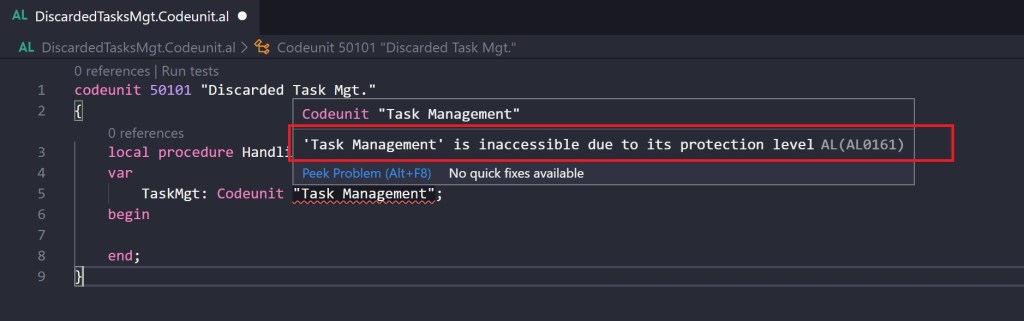
The codeunit is not accessible from B due to its protection level!
To grant extension B to access the Internal objects declared on extension A you need to open the extension’s A app.json file and add the internalsVisibleTo property as follows:
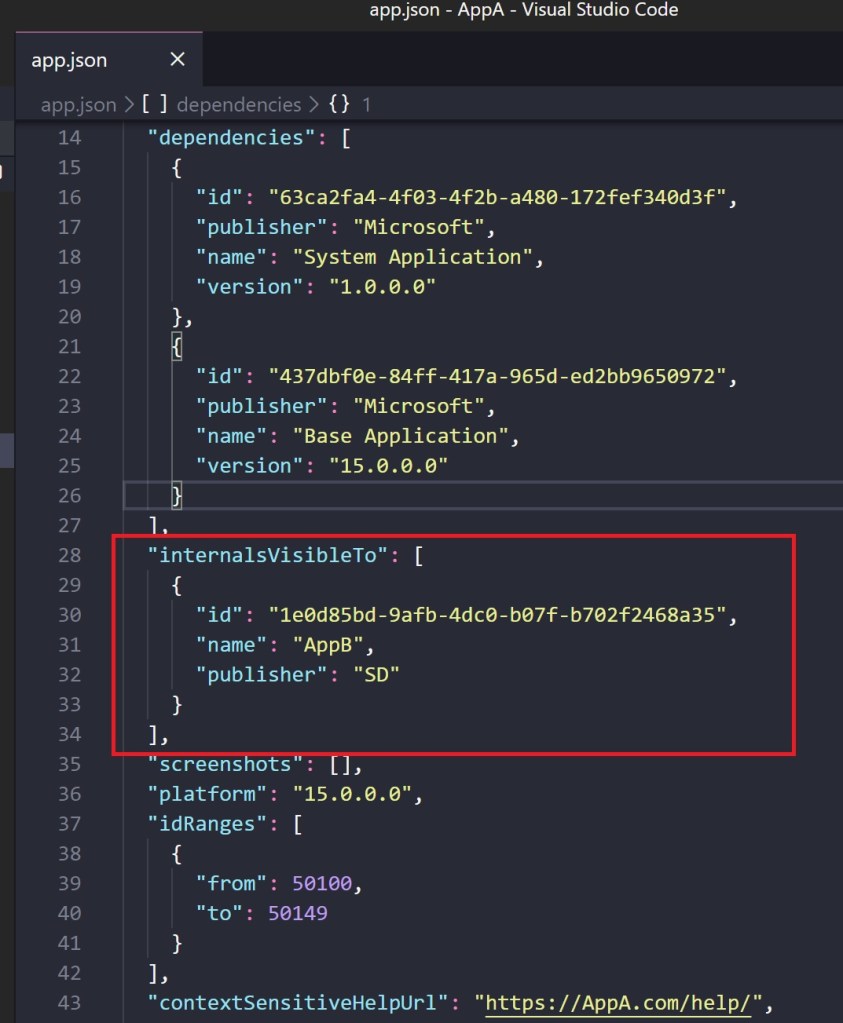
Here I’ve placed the references of the extension (B) that can see the internals objects declared on this app (A).
What happens now if you publish extension A and if you download symbols again from extension B?
Magically, you can now reference the internal codeunit and see its internal methods:

and you can also subscribe to the internal events:

I think that this property can be useful on some scenarios where you have some libraries that you want to share from a main app to certain dependent apps (submodules) but without exposing your business logic to all the possible dependent apps. Quite hidden but remember that you have also this possibility 😉

 Stefano Demiliani
hi,for other objects (tables, pages, reports), is it possible to block the display of the content (fields, variables, etc)?
LikeLike
I want to access fields from “Tax Component Summary” which is “Tax Engine”, How i should give “Internals Visible to” to this Tax Engine Extension?
LikeLike
Sorry but I’ve not fully understood your problem. The usage of the InternalsVisibleTo property is explained in the post, it permits to expose objects declared as Internal to other extensions.
https://docs.microsoft.com/en-us/dynamics365/business-central/dev-itpro/developer/devenv-using-access-modifiers
Tax Component Summary is a table declared as internal or not? Not clear…
LikeLike
Tax Component Summary (table ID: 20301) is a table declared as internal.. This table is present in “Tax Engine” Extension. How do i add my extension’s ID, name and publisher to that Tax Engine extension?
LikeLike
Sir, In your post saying we need to add our extensions ID, publisher and name details to the extension (Access=Internal) which we would like to get access. But I would like to get access from the “Tax component summary” table (Access=Internal) present in “Tax Engine”. How i can able to add my extension details like name, publisher and ID to the Tax Engine extension in BC?
LikeLike
Hi Stefano Demiliani,
How to handle this same situation when I have to subscriber to a base codeunit whose access property is Internal?
In this blog you could edit the app.json because both extension where created by you and you have edit feasibility.
Please help us to handle this situations for base objects
Thanks in advance
Regards,
Dhirender Singh
LikeLike
The blog explains how this work. If you are the owner of extension A and you have a codeunit declared as internal, this codeunit will NEVER be visible to third party extensions. As the owner of the app, you can use the InternalsVisibleTo property to expose it to certain apps.
So, speaking about your case: if the internal codeunit that you want to subscribe is declared in an extension that is not yours, you’ve no possibility unless you agree to expose it with the author of the third-party extension. This is a security design.
LikeLike
Got it, thanks for the clarification 🙂
LikeLike
Hi Mr. Demiliani,
I had been using this solution of yours as a reference for making a test app and it was working perfectly fine thanks to your explanations.
Just recently my environment got updated and I had to deploy my apps again with certain compatibility changes according to the new updated version but for some reason, my test app is not working as it was. It is behaving like I haven’t applied this solution. I am unable to understand what is happening. Can you help me explain what is going on?
LikeLike