


When talking about integrations with REST services or, more generally speaking, as a cross-platform data exchange protocol, working with JSON objects is a must.
JSON is a lightweight and language independent data-interchange format widely used on cross-services communications.
Dynamics 365 Business Central and the AL language extension have a rich support for handling JSON objects (with the native JsonObject, JsonArray, JsonToken, JsonValue objects), but with the next Dynamics 365 Business Central 2024 Wave 2 release (version 25) we’ll have something more.
Starting from Dynamics 365 Business Central version 25, query objects will support native Json serialization with the new Query.SaveAsJson method. The new method saves the resulting data set of a query as JSON.
The Json serialization will be done without special formatting (no indentation, in order to reduce the size of the serialized object) and DateTime values will be formatted accordingly to the UTC format (YYYY-MM-DDThh:mm:ssTZD).
This will be a very good addition, expecially in scenarios where you need to pass query results to an API or an external system. If you have an AL query object that returns the data you need to pass to an external system via a REST API, now you don’t have to manually create the Json objects (JsonArray, JsonObject and more) via AL code.
I love this addition and I would like to have it extended also to Table objects (at least to temporary tables). It’s quite common today in AL language to perform data operations in order to create a JSON object with data to pass to an external system.
In C# you can define a class object (let’s call it YourClass), then create a class instance and populate it with your data. Then the serialization to JSON is one line of code:
List<YourClass> YourList = new()
{
    new YourClass
    {
        Name = "Stefano",
        Country = "Italy"
    },
    new YourClass
    {
        Name = "John",
        Country = "USA"
    },
    new YourClass
    {
        Name = "Peter",
        Country = "Germany"
    }
 };
var json = JsonSerializer.Serialize(YourList);
Why not doing the same in AL?
You can yet perform a JSON serialization of a record object with a custom generic function like the following:
procedure SerializeToJson(var RecRef: RecordRef) JObject: JsonObject;
    var
        FieldRef: FieldRef;
        Fields: Record Field;
    begin
        Fields.SetRange(TableNo, RecRef.Number);
        Fields.SetRange(ObsoleteState, Fields.ObsoleteState::N);
        if Fields.FindSet() then begin
            repeat
                Clear(FieldRef);
                FieldRef := RecRef.Field(Fields."No.");
                JObject.Add(FieldRef.Name, Format(FieldRef.Value));
            until Fields.Next() = 0;
        end;
        exit(JObject);
    end;
and then you can use this function as follows (here an example on a Customer record):
trigger OnAction()
                var
                    JsonSerializer: Codeunit "SD Demo Files";
                    RecRef: RecordRef;
                    jObject: JsonObject;
                    txt: text;
                begin
                    RecRef.Open(Database::Customer);
                    RecRef.FindFirst();
                    jObject := JsonSerializer.SerializeToJson(RecRef);
                    jObject.WriteTo(txt);
                    Message(txt);
                end;
This code produces the following result:
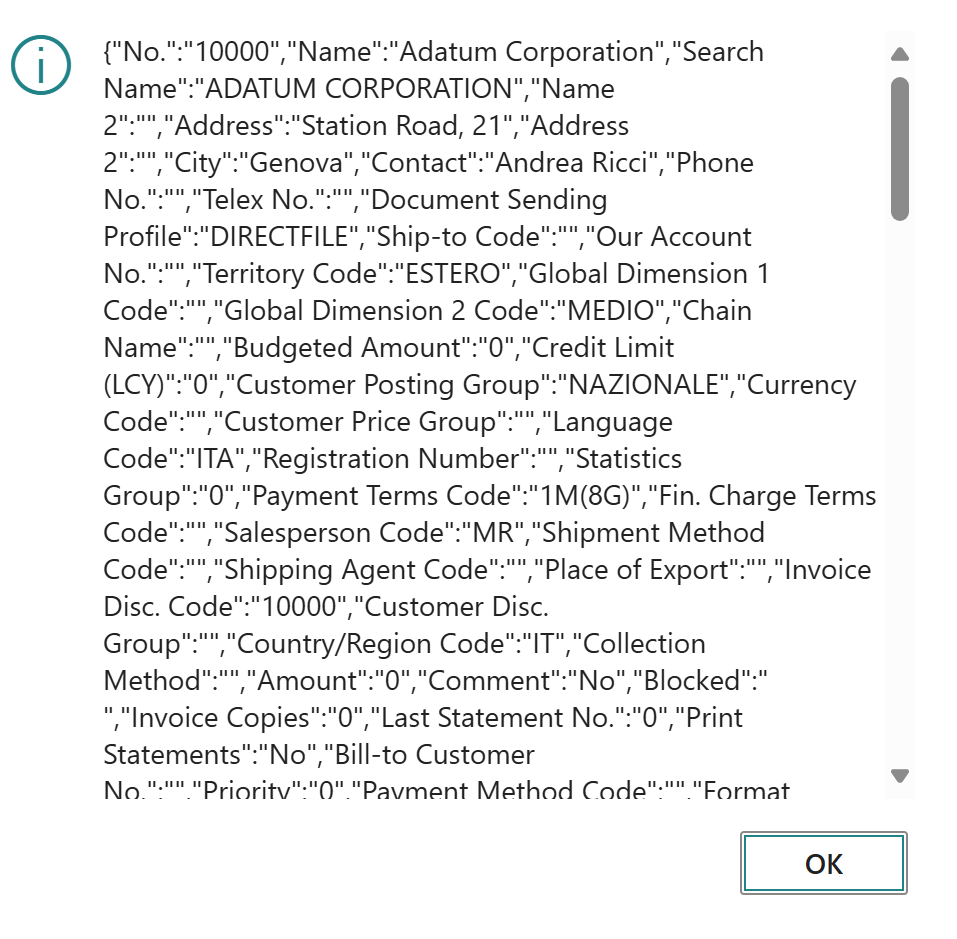
That’s good… but I would like to have something native in the platform for this.
I would like for example to create a temporary table, then create records on this table and at the end of the data processing I would like to serialize the content as a JSON object with a single operation. Something like in the following pseudo-code:
local procedure JsonSerializeTableDream()
    var
        myTemp: Record "My Table" temporary;
        outstr: OutStream;
        json: Text;
    begin
        //Create record 1
        myTemp."My Field" := 'Record 1';
        myTemp.Insert();
        //....
        //Create record N
        myTemp."My Field" := 'Record N';
        myTemp.Insert();
        //Save as Json
        myTemp.SaveAsJson(outstr);
        //Serialize as Json into a text
        json := myTemp.ToJson();
    end;
Difficult to implement? I don’t think so.
Let’s see what happens… and long life to JSON 😉

 Stefano Demiliani
is there a way to return a custom json with a bound action? This would be handly to return on the same endpoint different quey results based on the parameters, but last time I checked it was not possible to return a JsonObject but only a text.
In case i have to make a custom api with one or more parameters and return a json dinamically build based on the parameters, what is the best approach?
Thanks,
LikeLike
At the moment you cannot return a complex object, you can return a Text containing your Json value.
LikeLike