

In these days I had a talk with some partners asking me some guidelines and suggestions on how trying to convince some Dynamics 365 Business Central on-premises customers on moving to the SaaS platform.
The two partners I’ve talked with in these days have both the same situation: they have some big Dynamics 365 Business Central on-premises customers, totally happy with the product, that now would like to start moving their ERP platform to the cloud. But on doing this step, there’s a main problem: the cost of the storage! All the customers have some big databases, ranging from 500 GB to more than 1 Terabyte and moving these huge databases to the cloud could result in a not sustainable monthly cost.
I’ve also collected the same feedback also on socials (Yammer, Linkedin and more) where other partners asked about the future of this aspect.
This situation reminded me when, about 1 year ago, we internally did a survey among all our on-premises Dynamics 365 Business Central customers asking what are their main doubts or obstacles on moving their ERP to the cloud in a short time. We asked “What’s blocking (or could block) you on moving to the cloud?“
The top two responses in order of ranking were the following:
1st place: Can the cloud support the load necessary for my business?
2nd place: The cost of storage to move my current database (also considering the annual growth rate at the database level we have) is too expensive.
This makes me thinking a lot…
For point 1 I’m absolutely confident that we can always demonstrate (and we demonstrated) to such customers that they can go to the cloud without problems. We’re currently running on SaaS different very big customers and by tuning code, integrations and other things you can run your business in the cloud with confidence.
But the point on which I feel helpless and on which I have few points to object to their observations is the cost of storage. And the cost of the storage cannot be a SaaS-move killer for any reason!
Microsoft has actually a crazy cost policy on the Dynamics 365 Business Central storage. You start from a base entitlement of 80 GB per environment and then you add 3 GB per premium user and 2 GB per Essential user. This is your base space across environments in a tenant.
Then you can add (pay) additional capacity in slots of 1 GB (about 10$ per month) or 100 GB (about 500$ per month). Please correct me if I’m wrong with these numbers (I’m not involved in licensing so maybe I’m not fully updated, I’m just using what I know to be the publicly available prices).
Dynamics 365 Business Central is always more an enterprise platform. It’s absolutely not a product used only by small companies but instead we observe that the medium size of companies moving their ERP platform on Dynamics 365 Business Central is growing always more every month.
Nowadays it’s quite common to have companies ranging from 50 to 500 users moving to Dynamics 365 Business Central SaaS. And these companies have usually large volumes of transactions and lots of data. The platform can handle such types of volumes… but what about the storage cost?
For such type of companies, it’s quite common to have large SQL databases. If I observe all our customer base that’s using Dynamics 365 Business Central (SaaS and expecially on-premises) from a long time (hundreds of customers), this is the storage distribution that I have:
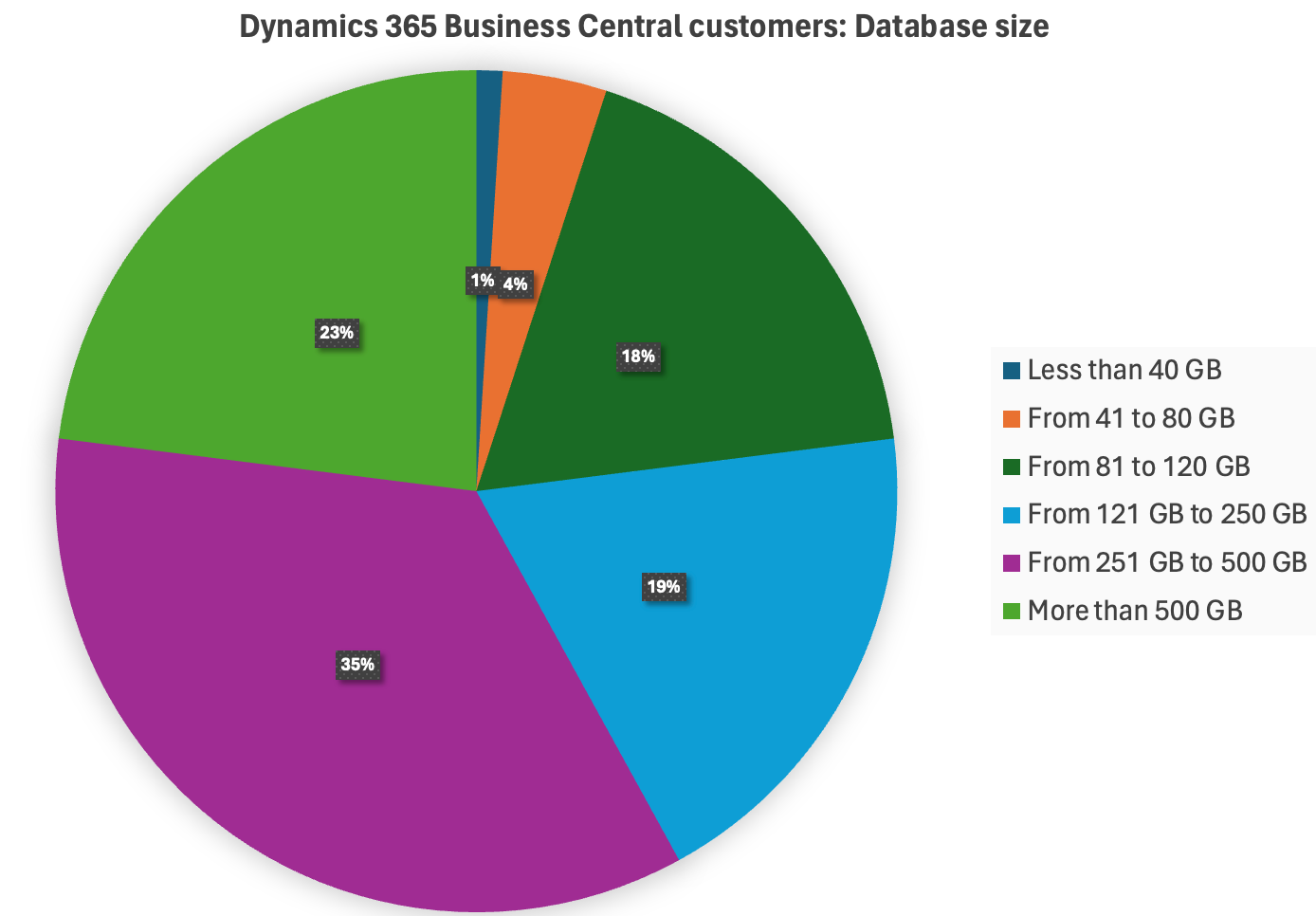
As you can see, the main percentage of our customers running Dynamics 365 Business Central currently have databases between 250 GB and 500 GB i size. But we have also a big percentage (about 23%) of customers with databases with more than 500 GB.
The percentage of customers that have databases ranging from 41 to 80 GB (standard Business Central baseline policy for SaaS storage) is about 4%. And 1% of our customers have databases less than 40 GB. But I can say more: the majority of our customers has a database growth per year that’s >= 100 GB.
What does that mean?
I think there’s not a lot to say: the standard actual Microsoft’s base entitlement for Dynamics 365 Business Central storage is not reflecting the actual customer’s situation. 80 GB as standard baseline is absolutely not enough and the price for additional 100 GB is too much. I don’t consider here the additional 1 GB storage option because it sound me crazy buying storage in blocks of 1 GB…
We need to say that Azure SQL applies page level compression by default, so if you migrate a 500 GB database from Dynamics 365 Business Central on-premises to the cloud, when migrated the database will decrease its final storage size (and probably you will have about around 380/400 GB of final database size). We have also a policy that when a customer asks for a cloud migration, we try to clean the database by deleting archived data and orphaned media, compressing some tables etc before starting the migration. But sometimes this is not enough to save space.
Let’s play with the numbers…
A customer with 100 Premium users has about 80 + 3 *100 = 380 GB of storage for free. To accomodate a database with 500 GB of data (compressed) they need to add other 2 * 100 GB blocks = 2 * 500 = 1000$/month.
A customer with 100 Essential users has about 80 + 2 * 100 = 280 GB of storage for free. To accomodate a database with 500 GB of data (compressed) they need to add other 3 * 100 GB blocks = 3 * 500 = 1500$/month.
But big databases are not only linked to big customers… we have lots of “small” customers that have businesses that generates tons of transactions and data (orders, invoices, G/L entries, Item Ledger Entries, Warehouse entries etc.) every day.
Let’s give other numbers (from real cases). We have some customers with a medium number of users (around 30/35) but with large databases due to the massive amount of transactions they’re doing every day. Some of them have currently databases around 500 GB (2 of them are on-premises customers with about 1 TB of SQL database size).
A customer with 35 Essential users has about 80 + 2 * 35 = 150 GB of storage for free. To accomodate a database with 500 GB of data (compressed) they need to add other 4 * 100 GB blocks = 4 * 500 = 2000$/month.
And let’s try to do a quotation for one of the 2 “small” customers with 1 TB of database. They have 30 Essential users. A customer with 30 Essential users has about 80 + 2 * 30 = 140 GB of storage for free. To accomodate a database with 1 TB of data (compressed) they need to add other 9 * 100 GB blocks = 9 * 500 = 4500$/month.
I think that it’s quite easy to understand why sometimes it’s difficult to argue with their observations, expecially when they compare the cost of the storage in the Azure platform or (worst case) the cost of the hardware for a full in-house hosting or for IaaS services.
What should be changed?
I repeat myself: storage cost cannot be an obstacle for moving the ERP to the SaaS platform.
An Azure SQL Single database with Standard tier, S3 level with 100 DTUs and 1 TB of storage costs about $257.68 per month.
An Azure SQL Single database with Premium tier, P1 level with 125 DTUs and 1 TB of storage costs about $456.25 per month.
What about Azure SQL elastic pool? An elastic pool with Premium tier, 125 eDTUs, 50 databases per pool, 1 TB of space costs about $905.38 per month.
I think that Microsoft should review their Dynamics 365 Business Central storage policy and adapt it to the current market. Dynamics 365 Business Central is now an ERP that suits also (and always more) the enterprise market and it cannot have a baseline storage entitlement of only 80 GB. 80 GB is nothing…
My personal suggestion (but I count less than zero on these topics 😀 ):
- Base entitlement: 250 GB
- Per-user allocation:
- Essential: 10 GB/user
- Premium: 20 GB/user
- Additional storage packages:
- 100 GB (2$/GB)
- 500 GB (0.5$/GB)
Could also be interesting to have platform features to move data and tables to a “cold” storage (staging), but this can require an hard work to implement. What I have in mind here is something like the possibility to copy the production environment to a different environment (running for example on Azure SQL in Serverless tier or similar, that will be active only when users will access it and then suspended after inactivity) with a low cost of storage and then having the possibility to “reset” the production to the current archive point (close entries at date and so on). In this way you can work for N years, then move the old data in a stage and continue to work with a fresh production. This was a trick that we used in the past (NAV era) with many large customers: if you’re using the ERP for 15 years, maybe having 15 years of history online is not the best for performances. Keep online the last 5 years and move to a “storage copy” (activated only on demand) the past 10 years of data.
Am I crazy? Probably… but I’m not here to suggest the numbers (I repeat that the above numbers are only coming from my mind) but to launch a message: we need a better storage proposition aligned with the customer’s needs. Please do something to review the current policy…
I’m curious to know what others think. What’s your customer’s situation in terms of database storage space? Is storage cost a SaaS killer for you or not?
If you want to support and amplify this message, please raise your voice and leave comments under this post or on my socials and share it. Microsoft is ready to listen to these requests and they want to know the real-world situation coming from the field.
Partners and customers, please share your opinions. Together we win… 😉
UPDATE:
As asked by many of you, I’m updating the post sharing the Dynamic 365 Business Central SaaS customer’s database size distribution that we currently have:

As you can see from the chart:
- Most of the customers are in the 121 to 150 GB database size range
- About 70% of the customers spans from 101 to 200 GB of database size
- Only 19% of the customers have databases less than 100 GB
- Only 10% of the customers have databases with size >= 201 GB
Some things that worth mentioning:
- Most of these customers are new customers that started with a fresh Dynamics 365 Business Central environment.
- About 40% of the customers with the biggest database size are customers that were migrated from on-premises environments.
- When we move on-premises customers to SaaS, per internal policy we try to never migrate the entire database history but we instruct the customer to start with a fresh database.
- We always try to avoid storing blobs into the database (in quite all these customers, Media and Blobs sizes are very small).
But when analyzing these data, there’s an extremely important aspect to consider: the database size growth for month or for year. Many of these customers have lots of transactions and they work with really big documents. We’re currently monitoring how the storage size is growing and we have retention policies in place but I’m absolutely sure that in few years many of these customers will double their storage size. And here is where the storage cost could become a problem…

 Stefano Demiliani
Great article with real concerns. Without getting into the details, it would be interesting to see how many customers with large DBs use lots of blob storage (file attachments, pictures for items, etc.). It would be great if this can be elegantly split to Azure storage and directly referenced in-place as if this data was in the DB. I know there are a few partners with solutions to save to Azure storage, but would be great if this was a simple setup/choice by the customer with a simple way of pushing it to ‘cold storage’ and an eloquent manner.
LikeLiked by 1 person
I 100% agree your suggestion. Additionally, the same calculation can be done for the Dataverse storage. The costs there a problem especially if you store documents in the database like E-Mails what CRM is made for.
LikeLike
I don’t have the numbers in front of me, but I think on average our customers have smaller database than yours, but we still find the cost of storage to be a blocker for some of them. Even those without a large database at the moment, are concerned about future costs that they will have no control over should their database grow faster than they expect.
LikeLiked by 1 person
Have you ever thought about , if this a “prevention price”?
A price, that prevents large customers to move BC to SaaS.
If you have sizes and users that are over a limit or in specific business cases, it would in my opinion be to risky to use SaaS.
If you have business critcal process like production or warehouses, that would depend on a connection to BC, going to SaaS would add multiple point of failures, like provider- , connection line issues, that may not directly depend on BC, but may prevent you from working or add additional monthly cost to prevent such failures.
On the other side does such a large installation not realy reduce costs, because you will also need local admins, and additional technique and costs to add connection redundancy.
Such large databases also require contious maintenace, means it’s own admin, something Micorsoft perhaps does not want to pay for.
If you look at the BC SaaS- Memory costs, they are in a size that allows you to install your own mirror server and also pay the admin with the costs for the first year.
But if this is the case, then Microsoft should be clear and support OnPrem customers and partners in a better way.
LikeLike
Thanks Stefano for this post…
We have some customers with Dynamics 365 Sales with attached licenses for Business Central – of course with the standard connector and a few optimizations on top.
We get a total of 10GB Dataverse capacity, plus 0GB for each attached license. With a little bit of data (customers, contacts, activities, sales documents), you can quickly reach 50GB of data. You can buy this for around 40$/1GB🫢; for 50GB that’s around 2000$/month.
I think: We need a better storage proposition aligned with the customer’s needs.
See you 😉
LikeLiked by 1 person
How do you deal with test environments in SaaS? I would also be interested in a survey.
Then a 300GB “database”, for example, doubles and you are already at 600GB. Our customers naturally prefer to test with their data/setup. Usually we offer an addional environment, because sandboxes are too slow.
For many partner solutions, there is also the problem that “production enviroentments” are billed, although these are then only used for tests. 😉
LikeLike
Hello Stefano,
Thank you for sharing your insights; you always help the community, although listening to our suggestions is not Microsoft’s strong suit. I agree with you; Microsoft holds an incredibly powerful tool that is perfect for large enterprises dealing with massive amounts of data. Compared to what the competition offers, the current prices for SAS storage are excessive.
In my experience with cloud migrations, I’ve found a way to manage by storing historical data in SQL and only migrating data from the last two fiscal years along with master data. With tools like Power BI, which allow me to access different data sources, I still have access to historical data for essential comparisons, but this is only a temporary solution. Given the rate at which our databases are growing, I see us potentially facing the same situation in two years.
I hope Microsoft steps up and adjusts their pricing; the proposal you put forth in the article seems very reasonable. If not, many of us will have to reconsider this strategy of keeping historical data outside the cloud.
Best regards,
LikeLiked by 1 person