

Copilot and agent capabilities in Dynamics 365 Business Central are available wherever Business Central Online is available, while Azure OpenAI Service is not. That gap is what “data movement across geographies” is about, and the same mechanism shows up across Dynamics 365 and Power Platform.
In Dynamics 365 Business Central (but not only) we have three concepts that people often mix up:
- Country/region version: the localization chosen when the environment is created. It cannot be changed later and it determines which Azure region hosts your data. It says nothing about where AI runs.
- Azure region for data residency: where the environment database physically lives. You can check it in the Business Central admin center, in the Azure Region field of the environment details.
- Azure OpenAI geography: where the AI model processes your prompt and generates the response. It is about where the AI “thinks”, not where your data is stored.
These 3 properties are independent.
When a user triggers a Copilot feature, the prompt and the generated output, including any personal data they contain, may leave your geography. Only the content of the interaction is sent for inference and the data is not used to train or improve the Azure OpenAI foundation models.
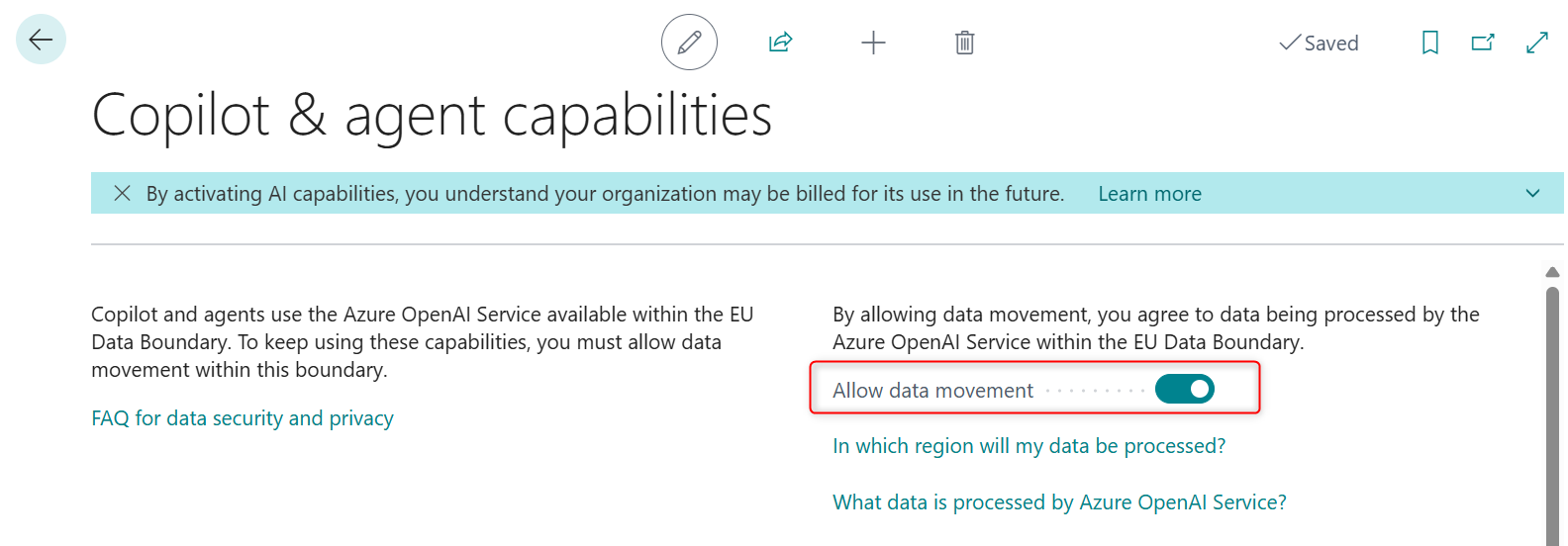
In your Dynamics 365 Business Central environment, when you access the Copilot & agent capabilities page you can see the presence of the Allow data movement toggle switch:
In other Business Central environments, the same page can appear different and the How do I govern my copilot data? link appears instead of the Allow data movement option:
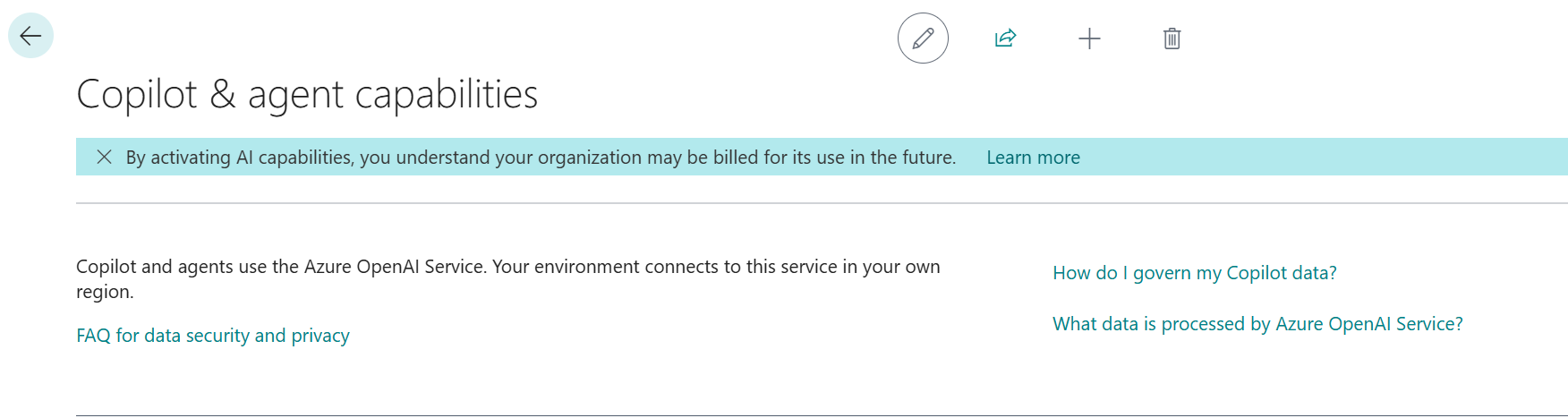
The presence of the Allow data movement toggle indicates that the location of your Business Central environment (where data is processed and stored) differs from the Azure OpenAI Service geography that Copilot uses.
Since update 25.0 this feature is on by default, so Copilot works without setup. An administrator can switch it off at any time, which deactivates the features that depend on it for the whole environment.
Routing depends on where the environment is hosted:
| BC environment hosted in | Copilot features processed in | Agent features processed in | Consent needed? |
| United States | United States | United States | No |
| West/North Europe, France, Germany, Norway, Sweden, Switzerland, Italy North | EU Data Boundary | EU Data Boundary | Yes |
| United Kingdom | Same geography as the environment | EU Data Boundary | Yes (agents) |
| Australia South East, India | Same geography as the environment | United States | Yes (agents) |
| Asia, Brazil, Canada, Japan, Korea, South Africa, UAE | United States | United States | Yes |
NOTE: this is the status at the time of writing this post. Things could change in the future..
Notice the trend: agents are more geographically constrained than classic Copilot features, so the same tenant can end up with two different data flows.
If you don’t want to provide consent to data movement, turn off the toggle. In this case, Copilot features won’t be available to your organization.
The same pattern across Dynamics 365 and Power Platform.
In the Dataverse and Power Platform world the control lives in the Power Platform Admin Center, in the Generative AI features card of each environment. Exactly like explained for Dynamics 365 Business Central, a Move data across regions checkbox, editable by a Power Platform or Dynamics 365 administrator, can appear if your environment location is different than the Copilot location. It is not displayed for US and government cloud regions.
When the Move data across regions checkbox is active:
- Data really moves only if the required model is not deployed in you region, as overflow when in-region processing capacity is exhausted, or when the in-region model has a reliability problem. Microsoft does not log, store or retain the input or output during this process.
- It is not reversible: clearing the checkbox does not undo movement that already happened while it was selected.
- Bing search and Microsoft 365 services can only be selected if data movement is already allowed. Data for Bing search is stored and processed in the United States for every region in Microsoft’s table.
- Not everything is governed by it: clearing the checkbox does not turn off all Copilot features. Some use alternative services, so use each feature’s own controls for anything you want disabled.
The processing map is similar to the one for Business Central: Europe, France, Germany, Norway, Sweden, Switzerland and Italy North stay in the EU Data Boundary; Brazil, Canada, Japan, Korea, South Africa and the UAE use the United States; Asia, Singapore, Australia and India use in-region capacity or the United States; the UK uses in-region capacity or the EU Data Boundary; government clouds stay in region.
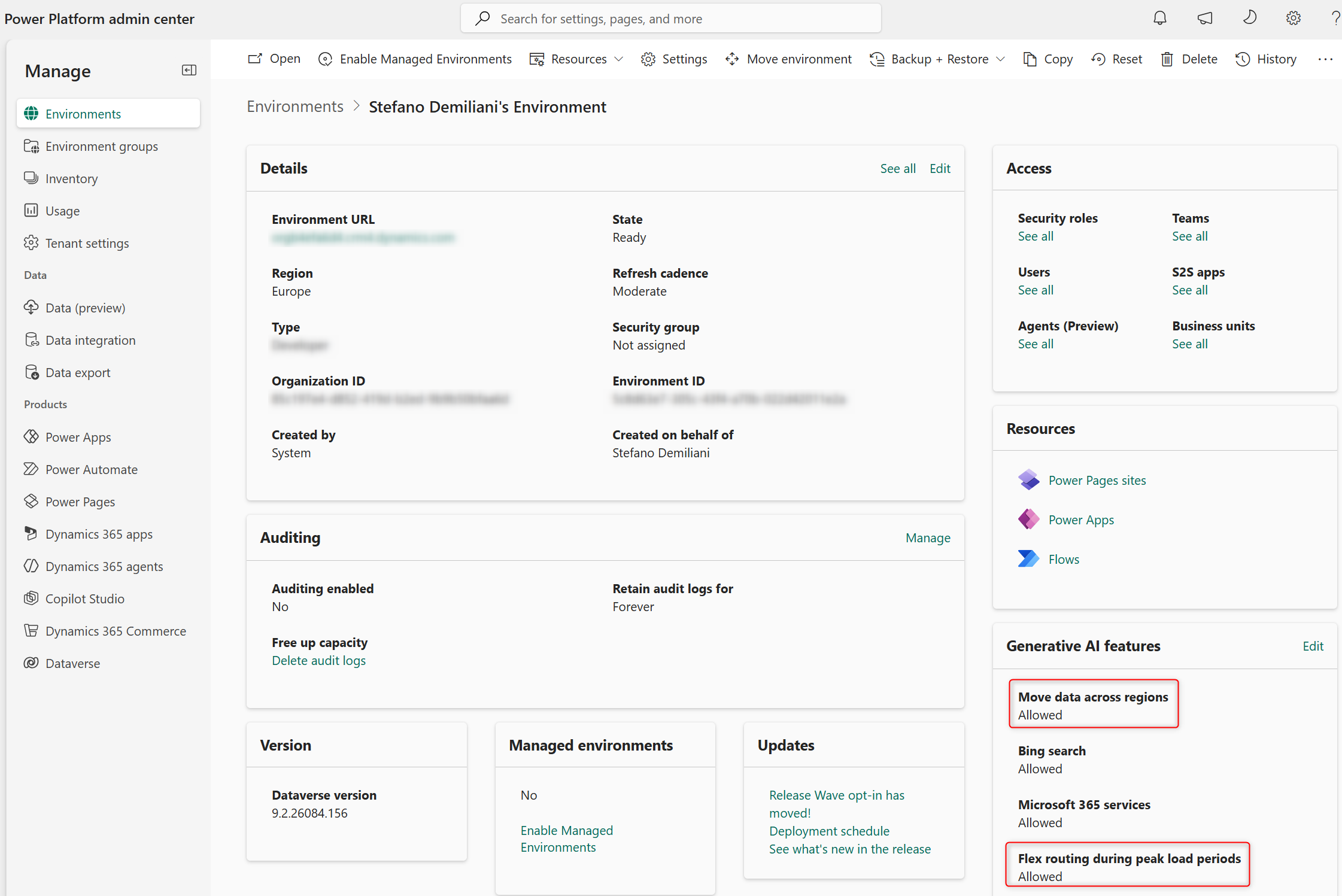
As you can see from the above image, Power Platform environments inside the EU Data Boundary get an extra option: Allow flex routing during periods of peak load. When enabled, LLM inference and the storage of associated pseudonymized data may happen outside the boundary during peak demand, to keep the experience consistent. When disabled, all inference stays inside the boundary, even at peak.
In this case data is encrypted in transit and at rest whatever the inference location, and that data at rest stays inside the boundary except for limited pseudonymized data kept for security and operational purposes. Flex routing is on by default for eligible tenants created after 25 March 2026; older tenants should check their Message Center notice. For a strict EU-only policy, this is a setting to review explicitly.
What about the Azure OpenAI layer?
The Azure OpenAI (of Foundry) layer is whwre your AI models are deployed. Azure OpenAI offers different deployment types that change where processing may happen:
- Global: prompts and responses can be processed in any geography where the model is deployed. Highest default throughput, best model availability, and the first place new models appear, but the weakest residency story.
- DataZone: processing stays within a defined zone, for example the United States or the EU member states. A common compromise for compliance and availability.
- Regional: processing in the region of the resource. The strictest option, with less capacity and fewer models.
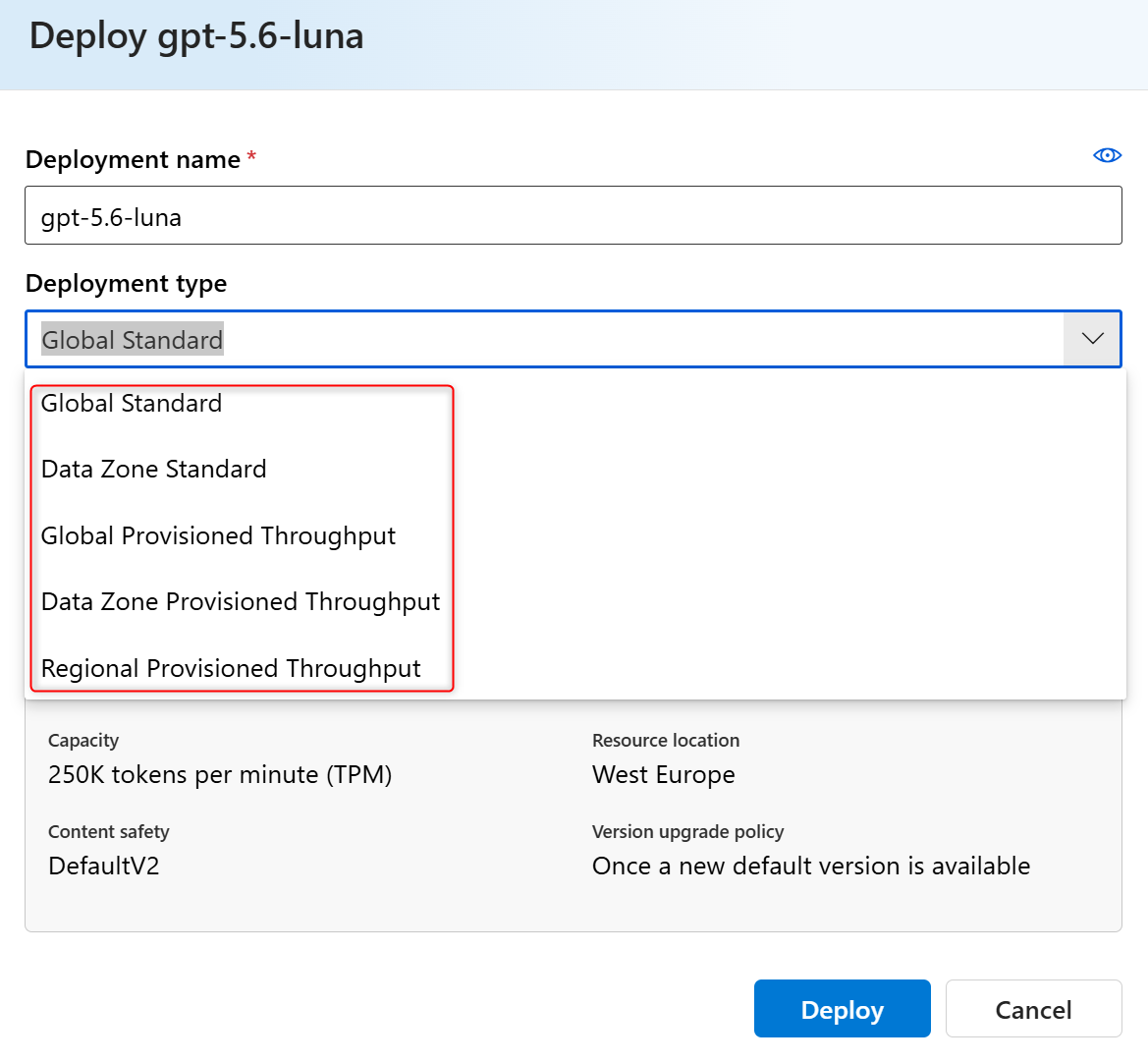
For Global and DataZone deployments, data at rest stays in the geography you selected; only the location of processing changes. Even regional deployments may route between regions inside the same geography for operational reasons such as capacity management. Models are stateless, so prompts and completions are not stored in the model.
This matters most when an extension brings its own Azure OpenAI resource: Microsoft’s documentation says publishers define their own regions for their AI features, so the choice of deployment type is yours and the compliance story is yours to document.
And what about GitHub Copilot?
I’ve received this question few times and it might be worth writing a short paragraph. When you use GitHUb Copilot for AI-assisted coding, you use an AI model and your data neeed to reach this AI model.
GitHub Copilot in VS Code is not a single service with a single region: each request is routed to whichever provider hosts the selected model:
- OpenAI models (GPT-5.x, GPT-6): hosted by OpenAI and by GitHub’s own Azure infrastructure, under a zero data retention agreement with OpenAI.
- Claude models: hosted by Amazon Web Services (Bedrock), Anthropic and Google Cloud. Zero data retention applies to generally available features, with two exceptions: Claude Fable 5 and 5.1, where Anthropic retains data by default for its safety classifiers (zero retention can be requested through the end of 2026), and some beta or preview features.
- Gemini models: hosted on Google Cloud.
- Grok, MAI and open-weight models: Grok runs on xAI under a zero data retention policy. Microsoft’s MAI-Code runs on Azure in GitHub’s tenant. Kimi K2.7 Code runs on Azure AI Foundry and Kimi K3 on Fireworks AI, both managed by GitHub.
- Inline suggestions: Ghost text and next edit suggestions run on Azure for Copilot Business and Enterprise, and on Fireworks AI for Free and Student plans.
On training, GitHub does not use Copilot Business or Enterprise data to train models, while for individual plans (Free, Pro, Pro+, Max) it may use interaction data unless the user opts out.
GitHub Enterprise Cloud with data residency offers an enterprise policy called Restrict Copilot to data residency compliant models. It launched in April 2026 and with this option you can enable a policy to ensure that all inference processing and associated data for GitHub Copilot remain within your designated geographic region. GitHUb Copilot with data residency is currently available in the following regions:
- United States
- European Union
but there are plans to add support for more regions in the near future.
This feature is Off by default. An administrator must switch it on explicitly, and doing so changes the pricing of Copilot requests (requests processed under the policy consume 10% more AI credits, to cover the extra cost providers charge for regional and compliance-certified endpoints).
The enforcement of this feature works at 3 layes:
- Authentication and routing: users’ tokens only grant access to the region-specific endpoints, so traffic cannot leave the designated geography.
- Model availability: Copilot surfaces only models that are certified and available in your region, and developers cannot reach models hosted elsewhere.
- Logs and telemetry: all Copilot-related logs and telemetry are stored in region-appropriate storage. GitHub’s stated result is that code, prompts and responses stay in the region during inference.
What about performance implications for AI data movement?
A cross-geography call adds network round-trip time, roughly tens to a couple of hundred milliseconds depending on the path. For an LLM call that already takes seconds, that is rarely what users notice. Prompt size, model choice and token generation are things with the greates impact on performance. So do not switch off data movement for performance reasons, and do not expect a closer endpoint to be a magic fix.
What you can influence on this topic is the AI design:
- Keep prompts lean and send the fields the model needs, not whole records. Fewer tokens mean lower latency, lower cost and less data crossing borders.
- Use streaming or asynchronous patterns for long generations.
- Handle throttling and timeouts gracefully. Shared regional capacity can return rate-limit errors at peak, and Microsoft recommends provisioned throughput when you need low latency variance at large volumes.
- Expect gradual rollouts. Model updates reach regions at different times (for example, the new default model for Business Central agents initially excluded the UK, India and Australia).
My rules of thumb here:
- Classify your data first: Know what can safely appear in a prompt before debating regions.
- Ask every vendor where inference runs: this includes every ISV extension in the tenant.
- Treat data movement consent as a governance decision: someone with authority should own the toggle, not whoever was named admin on day one.
- Include developer tools: coding assistants send code and prompts to model providers too, so review them with the same questions.
- Re-check regularly: regional availability changes pver time, so be updated.
- Log and monitor. telemetry on Copilot and AI usage is a practice you should have in place.
Conclusion
Data movement is less scary than it sounds, but it is not invisible. Your database stays where it is, your prompts may travel, and some settings decide whether, where and when. Know your environment’s region, know the target geography, know the exceptions, and make the decision deliberately.

 Stefano Demiliani