


A brief, sad story…
After spending a few days providing an advanced Azure Function training to a partner (with the goal of refactoring an old monolithic application for the cloud) and providing a few mantras to always follow when working with Azure Functions, disaster arrives.
With the partner’s IT team, we developed and published the first Azure Function (let’s call it FUNCTION1). I think you knowq that when deploying an Azure Function, there are a number of parameters that you need to specify, including the file storage required by the function app.
Everything was set up correctly. Everything worked, everyone was happy.
After a few days, the partner independently developed and published a second function (let’s call it FUNCTION2). To “save time and resources” when deploying this second function, the partner selected the same file share as the first one (why create a second useless resource if I already have one for the same purpose?).
Result: FUNCTION2 deployed correctly and working, but FUNCTION1 was destroyed! 💣💣💀
After the disaster, I asked: why have you done this, despite the recommendations I shared?
Answer: The storage account is mostly idle and we can save money by using one storage account. 😳🤯🤬
This is absolutely a NO NO NO!!

I talked about this topic 3 years ago at BC Techdays in my sessions on how to use Azure Functions at best and also I have a slide that I use on all the Azure-related trainings I do on this topic that recommends to never do that. I’ve probably never written a blog post about this topic before, so I thought it might be worth doing so to prevent others from running into this problem again.
Why this problem?
When designing cloud infrastructure, the temptation to optimize costs by sharing resources is often strong. However, when it comes to Azure Functions and specifically about its storage, sharing a single Azure Files share between multiple function apps can introduce a host of subtle but serious problems.
Azure Function apps have a fundamental parameters named WEBSITE_CONTENTSHARE. This application setting defines the name of the Azure Files share used by your function app for several critical operations:
- Storing the deployment package (zip files) across all instances.
- Enabling log streaming and diagnostic features.
- Supporting dynamic scaling by providing a consistent file location across scaled instances.
- Maintaining configuration state that functions may rely on.
The setting works in conjunction with WEBSITE_CONTENTAZUREFILECONNECTIONSTRING, which specifies which storage account the share resides in. These settings are essential for Premium and Consumption plan function apps on Windows.

If you’re using Azure Functions in the new Flex Consumption plan (my recommended choice now) you will have the following settings for storage:
AzureWebJobsStorage(usually the primary storage account).- DEPLOYMENT_STORAGE_CONNECTION_STRING: defines the blob container for code packages in Flex Consumption.
Unlike older plans, Flex Consumption uses a blob storage container for deployment, and it does not require WEBSITE_CONTENTAZUREFILECONNECTIONSTRING:
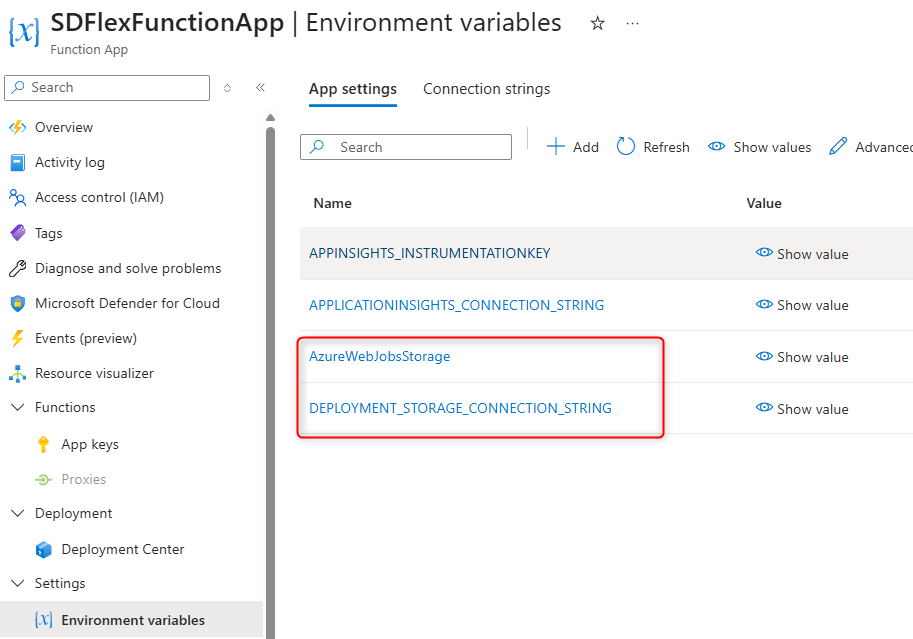
Sharing the same storage between function apps creates a serie of problems.
Azure Functions uses the shared file share to store deployment packages. When multiple function apps write to the same location, package conflicts can occur.
Each function app deployment writes its package to the shared file share. Without proper isolation:
- Concurrent deployments can overwrite each other’s packages (exactly what happened to my customer😙).
- Scaling instances might pull an inconsistent or corrupted package.
- Debugging becomes nearly impossible.
This is particularly dangerous because these problems may not surface during testing with single instances, but often they emerge unpredictably during peak load when scaling occurs.
Related to scaling, remember that Azure Files has inherent rate limits and throughput constraints. When two function apps share the same file share:
- Throughput is divided between both apps.
- One app’s scaling spike can negatively impacts the other function app.
- You can have file I/O operations contend for the same connections (with locking problems and so on).
- Performance becomes unpredictable and difficult to optimize.
If both function apps scale simultaneously during load, the shared file share becomes a bottleneck.
The file share linked to a function app also stores logs and diagnostic information. Sharing it between apps creates several issues also on this aspect, and expecially:
- Logs from multiple apps can be mixed together.
- Portal log streaming fails to display consistent output (you can see crazy results).
- Application Insights integration becomes unreliable.
Azure Functions also uses a “host lock” mechanism (a distributed lock implemented via Azure Storage) to ensure that only one instance of the Functions host is actively running in a given deployment. When multiple function apps share the same file share, they both attempt to acquire a lease on the same storage location, resulting in one app successfully acquiring it while the other fails (first come first served).
The impact of such scenario is that one function app can become completely non-responsive and start returning return HTTP 500 errors (difficult to detect).
If someone of you was at my last Azure training in Microsoft Italy, probably remember that I explained all these topics with some demos in details, so please don’t forget 😉
Conclusion
PLEASE NEVER DO THAT!
In a pure theory, multiple Azure Function apps can use the same storage account if each has its own file share (different WEBSITE_CONTENTSHARE values). In this case, isolation is maintained. However, even in this case, Microsoft best practice recommends using separate storage accounts for each function app in production. And for me this is more than a recommendation, it’s an obligation to always respect.
The cost of a dedicated storage account per function app is negligible compared to the operational complexity, maintenance burden, and potential downtime that sharing introduces. And, as said before, it’s very likely that this storage sharing will lead to overwriting the app function deployment files, thus causing you to “break” things.
As a fundamental principle: always provision a dedicated storage account for each function app, treating storage isolation as a non-negotiable architectural requirement.

 Stefano Demiliani