

One of the most consequential yet often overlooked architectural decisions in Azure Functions deployments is how you configure storage accounts. While it might seem like a simple infrastructure detail, the choice between using a shared storage account across multiple function apps versus dedicated storage accounts has profound implications for performance, scalability, cost efficiency, and operational complexity.
Why Azure Functions Needs Storage
Before diving into architectural patterns, let’s understand what Azure Functions actually uses storage for. This is essential context that shapes all subsequent decisions.
Azure Functions requires a storage account associated with your function app, which is configured via the AzureWebJobsStorage connection string and related settings. The Functions runtime uses this storage account for several critical operations:
Runtime Management: The Functions runtime uses storage to manage internal state, coordinate between instances, and track function execution metadata.
Dynamic Scaling: When your function app scales out horizontally (adding more instances), the Functions runtime uses the storage account to coordinate this scaling. Azure Files shares and lease management happen through this storage account.
Trigger Coordination: For queue-triggered, blob-triggered, and table-triggered functions, the storage account acts as the coordination point for distributing work across instances. The functions runtime manages leases, check-in points, and instance state through this storage.
Execution Logging: Host logs that track function invocations, execution times, and errors are written to the storage account.
Durable Functions State: If you’re using Durable Functions, the orchestration state, activity results, and replay history are all persisted in this storage account.
This is fundamentally different from application-level storage that your function code might use independently. This is infrastructure-level storage owned and managed by the Functions runtime itself.
Storage Account Configuration Specifics
When you create a function app, several application settings control storage behavior:
- AzureWebJobsStorage: The primary connection string for runtime operations. This is non-negotiable (every function app needs this).
- WEBSITE_CONTENTAZUREFILECONNECTIONSTRING: For Consumption and Premium plans on Windows, this points to Azure Files where your function code packages are hosted. This should ideally be the same as AzureWebJobsStorage for simplicity, though it can be different.
- WEBSITE_CONTENTSHARE: The name of the Azure Files share containing your function code. Auto-generated if not specified.
The Single Shared Storage Account Approach
In the simplest configuration, multiple function apps share a single Azure Storage account. This is often what happens by default when teams are starting with Azure Functions, particularly in smaller organizations or development environments:
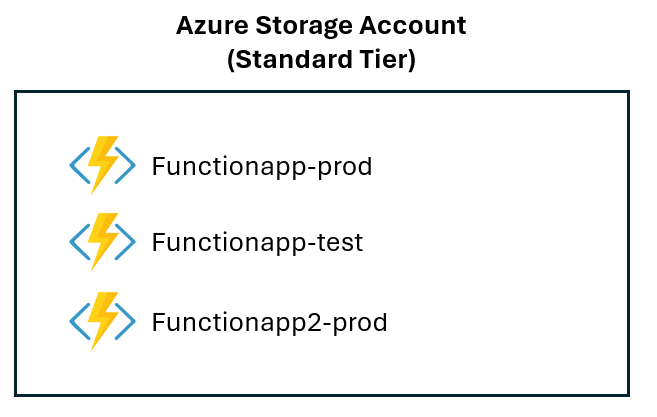
The (apparent) advantages are the following:
- Simplified Management: Administratively, there’s less to manage. You have fewer Azure resources to track, fewer costs to itemize, and simpler access control (though this is often an illusion, as we’ll see).
- Reduced Cost (Initially): With fewer storage accounts, you might think you’re saving money. However, this ignores the performance and scaling penalties that often result in higher overall costs.
- Fewer Firewall Rules: If using Azure Firewall or Virtual Network restrictions, you have fewer storage account endpoints to manage.
Using a shared storage account approach can have serious problems:
- Throttling Risk: Azure Storage accounts have service-level rate limits. For Blob Storage, you’re limited to 20,000 requests per second (for standard accounts with replication). While this sounds high, in production environments with multiple function apps running simultaneously, you can hit these limits more easily than you’d expect.
- When one function app experiences a surge in activity—perhaps due to a batch job or unexpected load spike—it can consume available request quota, causing other function apps sharing the same storage account to experience latency and throttling.
- Connection Pool Exhaustion: Each connection to the storage account consumes limited connection resources. With multiple function apps all competing for connections to the same account, you can encounter connection timeout issues, particularly with Durable Functions and Event Hubs triggered functions that maintain persistent connections.
- Lease Contention: Azure Blob leases are used by the Functions runtime for coordinating work distribution. When multiple function apps are competing for leases on the same blobs, you increase contention and can cause coordination delays during scaling events.
- I/O Contention: Essentially, you’re creating a noisy neighbor problem. A function app with heavy I/O activity to its own containers can degrade performance for other function apps’ metadata operations.
The Dedicated Storage Account Approach
In this approach, each function app (or each functional grouping of related function apps) gets its own dedicated storage account:
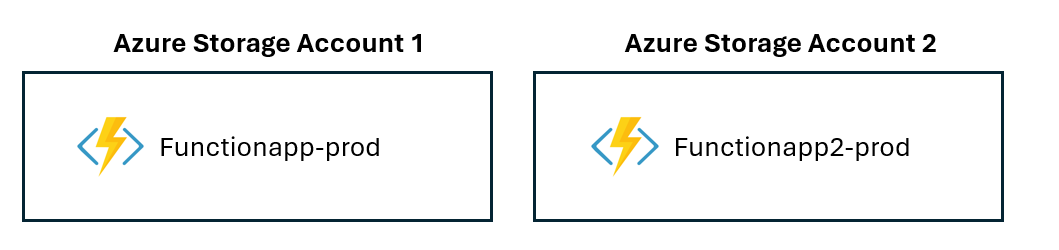
This approach has real performance benefits:
- Isolated Rate Limits: Each storage account has its own rate limit quota. This means that a surge in one function app doesn’t affect others. Each app gets its full 20,000 requests/second allocation.
- Reduced Contention: Lease operations, metadata lookups, and coordination operations happen against isolated blob leases. This dramatically reduces contention, especially important for Durable Functions which are heavy users of state management.
- Better Scaling Coordination: During scale-out events, the runtime’s metadata operations for managing instances happen against a less congested storage account, resulting in faster and more responsive scaling.
- Predictable Noisy Neighbor Isolation: You eliminate the noisy neighbor problem entirely. A batch job running in one function app cannot affect the latency characteristics of a different function app.
and this should always be the approach to follow in production. Remember also that to reduce latency, you need to create the storage account in the same region as the function app.
For runtime operations, Standard tier accounts are sufficient. Premium tier offers higher performance limits but is rarely necessary for the runtime’s own use. Reserve Premium for when your application code itself has heavy storage demands.
Performance Analysis: Shared vs. Dedicated Accounts
Here are some realistic performance results in a real-world scenario:
- 3 function apps, each processing ~2,000 messages/second
- Consumption plan on Windows
- Storage operations: queue peeks, queue deletes, state writes
- Shared storage: Single Standard storage account
- Dedicated storage: Three separate Standard storage accounts
The average storage operation latency was moved from 47ms (shared account) to 18ms (dedicated account), with a reduction of 62%:

The instance scaling time was 60% faster. Runtime throttling events (per hour) have a reduction of 90%.
The Storage Operation Latency can be monitored via Application Insights with the following KQL query (for critical apps you should establish baselines and trigger alerts on degradation):
let storageOps = requests
    | where cloud_RoleName == "FunctionApp"
    | where duration > 100
    | summarize Latency=avg(duration), P95=percentile(duration, 95) by tostring(cloud_RoleInstance);
The storage operation latency correlated with the number of instances of your function app (instance count change) is useful to detect scaling inefficiencies.
Here is a KQL query to detect those inefficencies:
// Detect instance count changes and correlate with storage latency
let instanceCountOverTime = requests
    | where cloud_RoleName == "your-function-app-name"
    | extend InstanceId = cloud_RoleInstance
    | summarize
        InstanceCount = dcount(InstanceId),
        SampleTime = min(timestamp)
        by bin(timestamp, 1m), cloud_RoleName;

let storageOperations = requests
    | where cloud_RoleName == "your-function-app-name"
    | where customDimensions.OperationType in ("BlobRead", "BlobWrite", "QueuePeek", "QueueDelete", "TableRead", "TableWrite")
    | summarize
        AvgLatency = avg(duration),
        P95Latency = percentile(duration, 95),
        P99Latency = percentile(duration, 99),
        OperationCount = count()
        by bin(timestamp, 1m), cloud_RoleName;

instanceCountOverTime
| join kind=inner (storageOperations) on timestamp, cloud_RoleName
| extend InstanceChange = InstanceCount - prev(InstanceCount) by cloud_RoleName, (timestamp)
| where InstanceChange != 0 // Only show when instance count changed
| project
    ScalingTime = timestamp,
    FunctionApp = cloud_RoleName,
    NewInstanceCount = InstanceCount,
    PreviousInstanceCount = prev(InstanceCount),
    InstanceChange,
    AvgStorageLatency = AvgLatency,
    P95StorageLatency = P95Latency,
    OperationCount
| order by ScalingTime desc
This KQL query can be useful for creating alerts when scaling causes latency degradation:
// Alert: Detect when scaling causes latency spikes
let baselineLatency = requests
    | where cloud_RoleName == "your-function-app-name"
    | where customDimensions.OperationType in ("BlobRead", "BlobWrite", "QueueOp")
    | where timestamp > ago(7d) and timestamp < ago(1d) // Last week, excluding today
    | summarize P95Baseline = percentile(duration, 95) by cloud_RoleName;

let currentLatency = requests
    | where cloud_RoleName == "your-function-app-name"
    | where customDimensions.OperationType in ("BlobRead", "BlobWrite", "QueueOp")
    | where timestamp > ago(10m)
    | summarize CurrentP95 = percentile(duration, 95), InstanceCount = dcount(cloud_RoleInstance) by cloud_RoleName;

let instanceChanges = requests
    | where cloud_RoleName == "your-function-app-name"
    | summarize InstanceCount = dcount(cloud_RoleInstance) by bin(timestamp, 1m)
    | extend InstanceCountChange = InstanceCount - prev(InstanceCount)
    | where InstanceCountChange != 0
    | summarize RecentScalingEvent = max(timestamp);

baselineLatency
| join kind=inner (currentLatency) on cloud_RoleName
| join kind=inner (instanceChanges) on cloud_RoleName
| extend LatencyIncrease = CurrentP95 - P95Baseline
| extend IsAnomalous = LatencyIncrease > (P95Baseline * 0.5) // 50% increase threshold
| where IsAnomalous
| project
    FunctionApp = cloud_RoleName,
    BaselineP95ms = P95Baseline,
    CurrentP95ms = CurrentP95,
    IncreasePercentage = round((LatencyIncrease / P95Baseline) * 100, 2),
    CurrentInstanceCount = InstanceCount,
    LastScalingEvent = RecentScalingEvent,
    Alert = "Scaling-Related Latency Spike Detected"
Remember that for better monitoring Azure Functions with Application Insights, it’s also a good practice to log custom dimensions in your function code, like in this simple C# example:
public static void Run(
    [QueueTrigger("myqueue")] string message,
    ILogger log,
    TelemetryClient telemetryClient)
{
    var sw = System.Diagnostics.Stopwatch.StartNew();

    // Your storage operations here
    var blob = blobClient.GetBlobClient("myblob");
    await blob.DownloadAsync();

    sw.Stop();

    telemetryClient.TrackEvent("StorageOperation", new Dictionary<string, string>
    {
        { "OperationType", "BlobRead" },
        { "InstanceId", Environment.MachineName }
    }, new Dictionary<string, double>
    {
        { "LatencyMs", sw.ElapsedMilliseconds }
    });
}
Conclusion
The decision between shared and dedicated storage accounts for Azure Functions isn’t purely technical but it’s mainly about resilience, scalability and performance predictability.
Dedicated storage accounts provide measurable performance benefits, eliminate the noisy neighbor problem, and reduce operational friction. The cost savings from simplified management are essentially zero—the added cost of an extra storage account is negligible compared to the operational overhead saved. The architectural decision you make at the beginning of your Azure Functions journey will compound over time.
Your storage account configuration deserves the same attention as your function app design itself. Get this right, and your Azure Functions platform will scale smoothly, perform predictably, and remain operationally transparent. Get it wrong, and you’ll spend days debugging mysterious throttling issues and performance degradation that trace back to a foundational architectural decision.
P.S. If you’re currently using a shared storage account for some of your Azure Function app and want to migrate to using a dedicated one:
- Create new dedicated storage accounts in the same region as your Function app
- Update function app’s
AzureWebJobsStorageconnection string with the conection string of your new storage account
Switching storage accounts doesn’t require redeployment or downtime for your function code.

 Stefano Demiliani