


Microsoft has publicly announced today the plans for the 2024 Wave 2 release of their Dynamics 365 and Power Platform products. Lots of interesting features are coming also for Dynamics 365 Business Central on every aspect and to know more I encourage you to check this link.
In this post I want to emphasize some of my favourite developer-related features that will be available on Dynamics 365 Business Central 2024 version 25.
Support for working with external app dependencies.
Creating AL extension with dependencies from other PTEs or AppSource apps is quite a common scenario and sometimes today this requires to contact the other app’s publisher in orderto have symbols. In this release a new feature will be available for allowing resellers and publishers to download symbols for AppSource applications and to use these to develop against on-premises and in containers. In addition, there will be available also some GitHub actions to make it easy to provision online sandboxes with the required applications installed to run tests on.
Extensibility for interfaces.
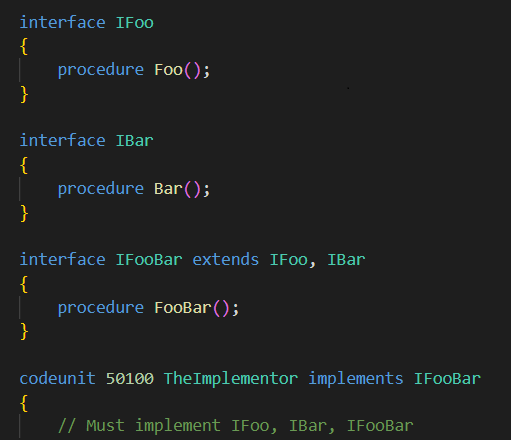
In version 25 (AL Language version 14) you will be able to extend AL interfaces. When implementing an interface that extends other interfaces, the implementor must also implement all methods from all extended interfaces.
The feature also works with the testing and casting new operators is and as. An example of usage is the following:
Extend and customize profiles from other extensions.
Also profiles defined in AL language will be extendible on Business Central version 25 by using the new profileextension object. Here an example of usage:

Package resources in extensions and access from AL.
This is a feature that I’ve personally asked from a long time. With Business Central version 25 you will be able to package resources in extensions and access the content of these resources from within AL code. This will be extremely useful to pack in your extensions some setup or demo data for example, things that now requires to load from external sources.
Pull extension source from GitHub when opening Visual Studio Code from the web client.
This is another great feature that I personally like a lot. With Dynamics 365 Business Central version 25 you will be able to open the extension’s code (from the Extension Management Page) by using the source and build metadata in the manifest of an extension and to pull source from the related GitHub repository and from a specific build. This allows navigating code for the extensions that you have source access to and allows you to hotfix a given build or sync to get the latest changes for investigation or development.
Before explaining how this feature will work, please remember that this will not break the IP of an extension. If you want to not share code, code will be protected as always.
From the Extension Management list page, you now have a new Open Source in VS Code option in the context menu for an extension:

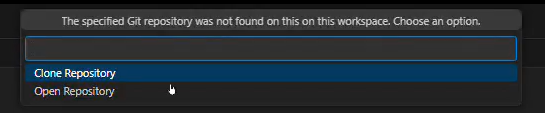
Visual Studio Code will open and ask you whether to clone or open the GitHub repo for the extension:
The app.json manifest of extensions now contains two new properties, Source and Build. These can be used to track source location and the build context.
For defining the source repo, we have
- repositoryUrl, which is the URL of the repository where the source code of the project can be found.
- commit, which is an ID of the source code for the current version of the project, that allows getting back to the commit that triggered building the extension.
For build, we have:
- by, which is useful for tracking the build agent/system that orchestrated the build; for example, AL-Go for GitHub.
- url, which can be used for the URL to the build system invocation where the build can be found.

These parameters should not be fixed but instead inserted via pipelines.
Performance Profiles scheduling rules
In addition to the existing interactive way of capturing a performance profile (via web client) a new rule-based scheduling mode for capturing profiles in the background is added.
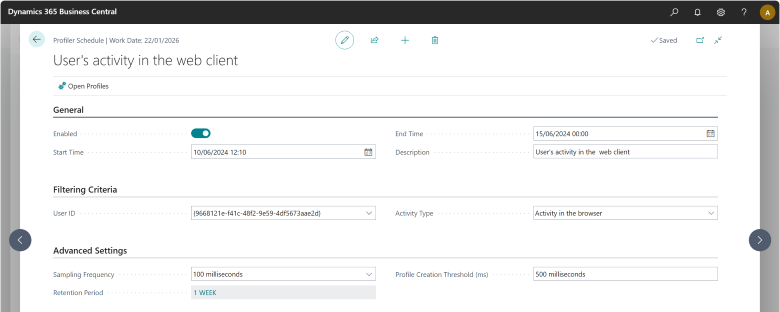
With this, a customer admin, consultant, support person or developer can set up a specific scheduled rule, for example, to profile as a given user and session type for a given duration. Once the rule is defined and enabled, the server will trigger a profile each time the rule is met. At the end of the duration, profiling will stop, and the results can be inspected to see if there are any performance issues, including intermittent or long running ones.
To create a new profile rule schedule, open the Performance Profiler Schedules page. This lists the defined schedules, and the additional schedule details. From here, you can create a new schedule.
Restore extensions when publishing from VS Code fails.
This helps to solve a noisy issue that could happen during development. When deploying an extension from Visual Studio Code, which is part of a graph of installed extensions on the target environment, first level dependent extensions are uninstalled and unpublished in order to be recompiled once the extension has been deployed. However, if the deployment from Visual Studio Code fails (for example, due to a compilation issue on the server), the server is left with an incomplete graph of installed extensions. This results in unnecessary manual work to redeploy the previously installed extensions in the correct order. With this release, Visual Studio Code now tries to restore the previous extension state, removing the need for manual work in most cases.
Manage per-tenant extensions in Admin Center.
This is a features also for administrators, but I want to signal it here. In Dynamics 365 Business Central version 25 you will have a new feature that lets Business Central administrators manage PTEs from the Business Central admin center and its related API (very similar to the way you can manage AppSource apps today). This feature saves time and effort because admins can manage PTEs across different environments and tenants without having to go to the client of each environment.
It will also be possible to check the compatibility between the base application and other apps installed on an environment directly from the admin center, in order to proactively detect potential problems during upgrades.
But that’s not all…
These are the developer-related features I like the most. But that’s not all… other exciting features will come (I’m expecially excited about new features coming in a topic that usually I try to avoid, reporting), so stay tuned for more.

 Stefano Demiliani