

Power Automate (and as I always say in this case, Azure Logic Apps too) has a great connector for Dynamics 365 Business Central that permits you to interact with triggers occurring on our favourite ERP and automate actions.
In the Dynamics 365 Business Central connector, you have a set of triggers related to data changes in Dynamics 365 Business Central records:

These triggers starts when a user creates, modifies, renames or deletes a record in Dynamics 365 Business Central.
In the past I’ve talked about some of the “hidden” limitations that these types of triggers have (you can read a post here) but there’s also another important aspect that you should be aware of when using them: these triggers rely on job queue under the hood.
What does that mean?
Let’s consider the following example:

Here we have a flow that starts when a user creates a new record in Dynamics 365 Business Central and then the action retrieves the context of the created record for doing some tasks.
When a Dynamics 365 Business Central licensed user creates a record, a job queue task is started and the trigger is executed (passing the context of the created record).
But what happens is the user creating the record is a partner-related account, like a Delegated Admin account? By design, a delegated admin CANNOT do the following:
- Run scheduled tasks in the job queue.
- Trigger a web hook or any other application action that relies on the job queue functionality, except by using the Run once (foreground) action.
This means that if the user creating the record is a partner-related account, like a delegated admin account, the Power Automate trigger is not fired. The related job queue task under the hood is created and queued and your workflow is not immediately fired. The trigger will be executed only when a licensed user creates a record in Business Central.
If this behavior (that is by design) can affect your workflow scenario, it’s probably better to rely on External Business Events, that instead are a server-side technology that is not relying on job queue.
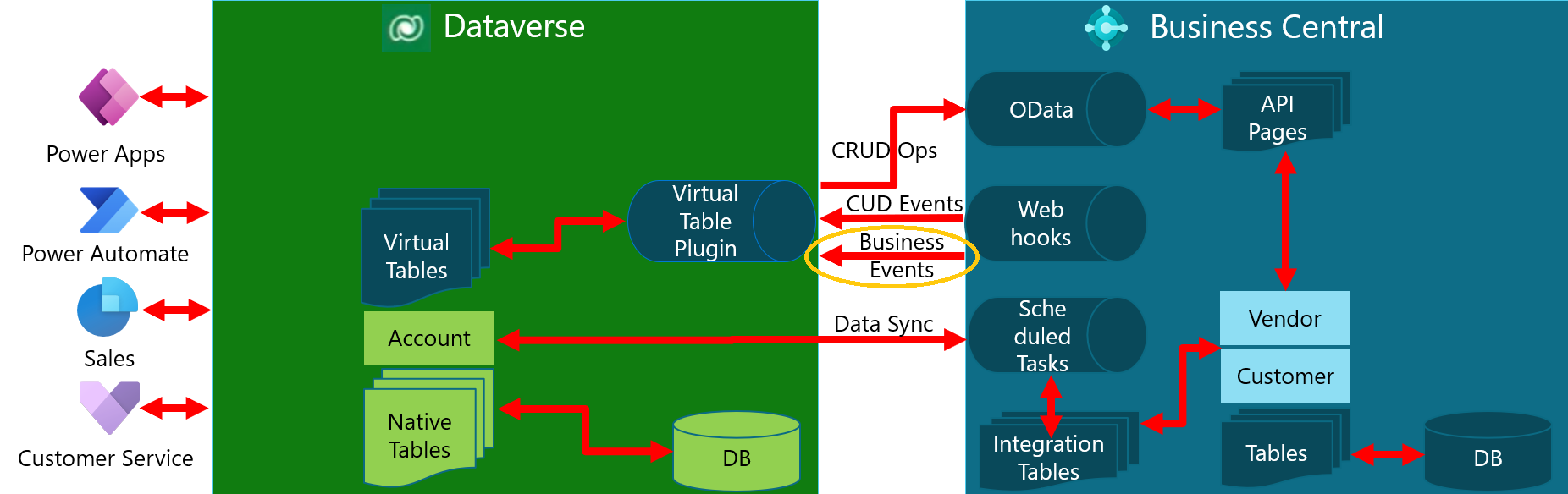
With the External Business Events technology, you can:
- Create an external event in your AL code passing the context of the record (SystemId for example)
- In Power Automate or Azure Logic Apps connector, you can use the When a business event occurs (V3) trigger selecting the event ro react as a starting point of your workflow:

This will be a much more reliable workflow trigger…
As a side note, please also remember that:
- Delegated admins should only do administration tasks, not perform any business-related activities.
- There could be more reasons for not being allowed to create job queue entries, e.g. missing permissions, or limited user license.
- If the webhook notification is delayed because it is not allowed to create a job queue entry, another user will only trigger it if they perform an activity on an entity that has an active webhook subscription.
- External Business Events are a good alternative for webhooks, but they are not available out-of-the-box for APIs. You need to create them yourself, while webhooks are automatically available for any API. This is something to be aware of.

 Stefano Demiliani