

When working with code on some complex data operations, sometimes to improve performances it’s possible to use code techniques like parallel programming and/or data parallelism.
Data parallelism refers to scenarios in which the same operation is performed concurrently (in parallel) on elements in a source collection or array. In data parallel operations, the source collection is partitioned so that multiple threads can operate on different segments concurrently.
With .NET Framework, the Task Parallel Library (TPL) supports data parallelism through the System.Threading.Tasks.Parallel class. This class provides method-based parallel implementations of for and foreach loops by using the Parallel.For and Parallel.ForEach constructs in C#. Basically speaking, you write the loop logic for a Parallel.For or Parallel.ForEach loop much as you would write a sequential loop. You do not have to create threads or queue work items. In basic loops, you do not have to take locks. The TPL handles all the low-level work for you.
The Parallel class’s ForEach method is a multi-threaded implementation of a common loop construct in C#, the foreach loop. Recall that a foreach loop allows you to iterate over an enumerable data set represented using an IEnumerable. Parallel.ForEach is similar to a foreach loop in that it iterates over an enumerable data set, but unlike foreach, Parallel.ForEach uses multiple threads to evaluate different invocations of the loop body. As it turns out, these characteristics make Parallel.ForEach a broadly useful mechanism for data-parallel programming.
Using this class in your code can sometimes help a lot on improving the code performance because your code can use all the core power of your CPU.
Let’s consider a real-world scenario (we want to see the numbers!). I have a custom code processing a data file with more than 1000 lines (this data file contains each single item sold in a local point of sales in the format ITEMNO;QUANTITY) and for each of these lines I need to check matching fields with a dictionary coming from another file (that contains items number with bonus coming from the headquarter, about 5000 lines each time).
My code loads the data file coming from the point of sale in memory in a document Dictionary object and then for each key in this dictionary, it performs a check on another Dictionary object created loading the data file coming from the headquarter.
We need to loop through the document Dictionary items and for ech value we need to check for the matching in the headquarter’s file. The standard way of doing that in C# was something like this:
foreach (KeyValuePair<string, string> document in documents)
{
    documentAnalyzer.Analyze(document.Value);
}
Here the Dictionary is looped and for each key value we process the data file accordingly to that value (calling the documentAnalyzer.Analyze method that contains the matching logic). The processing is done in a single thread:
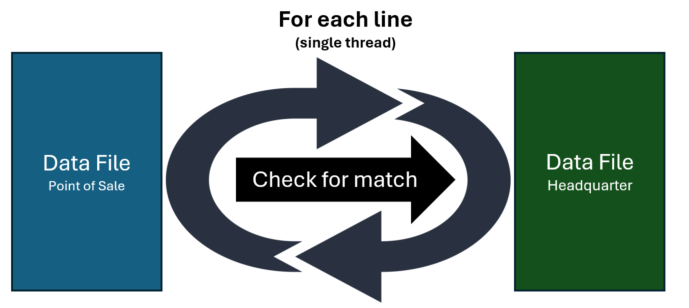
But if we want to maximize performances, why don’t do that in a parallel way?
The processing of the data files (about 1000 records each) for each 5000 Dictionary key value (from the headquarter’s data file) can absolutely be done in parallel instead of in a single process:

The parallel way of doing that with the new C# Task Parallel library is the following:
Parallel.ForEach(documents, kvp =>

{

    documentAnalyzer.Analyze(kvp.Value);

});
What are the results of these data file processing methods?
I’ve measured the elapsed time for processing a data file for the single thread method and the new parallel method (that uses the Parallel.forEach construct). Here is the result of an execution:

You will have similar numbers if you repeat the execution for different files:
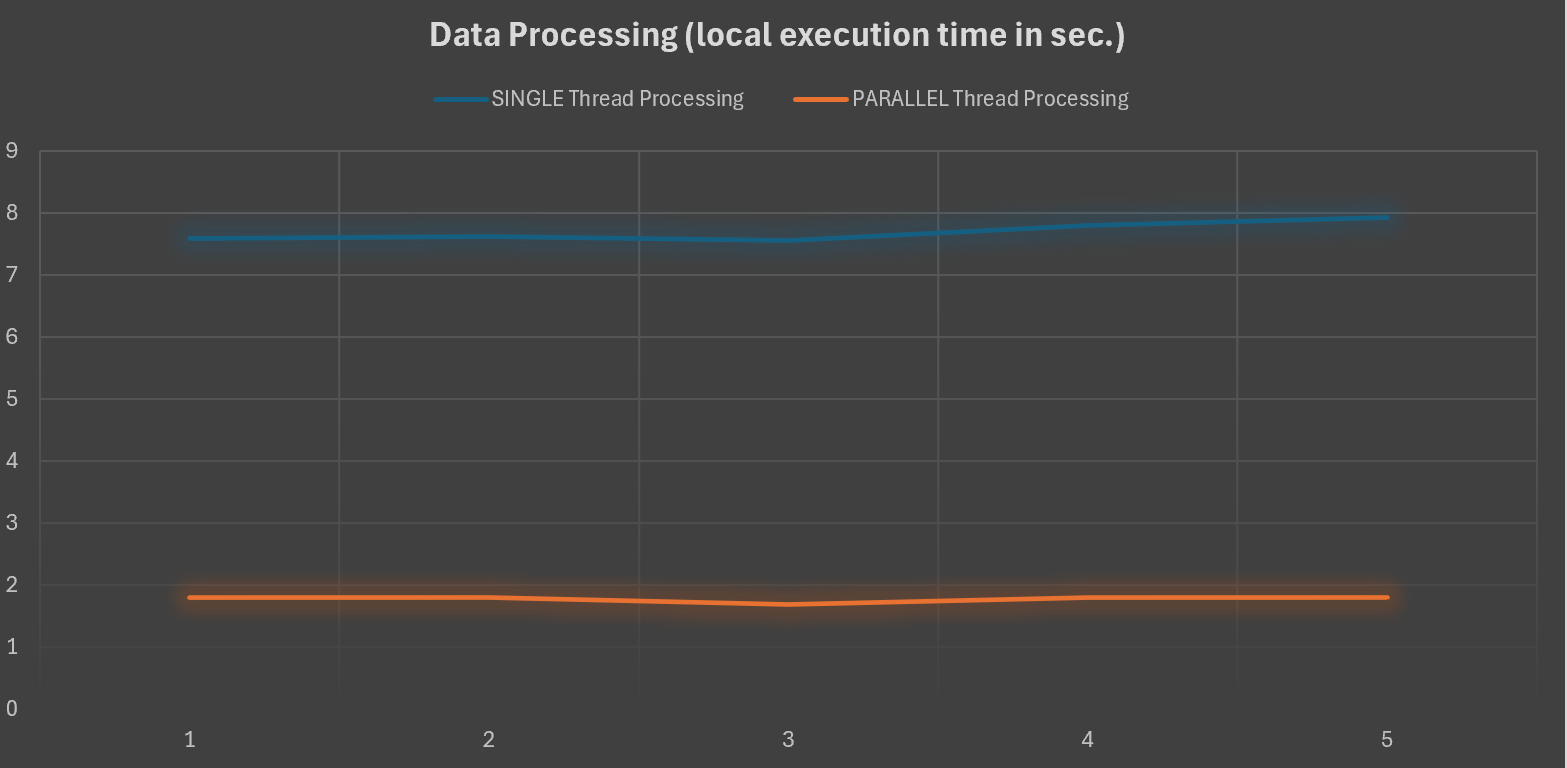
As you can see, the way of processing a 1000 record data file matching lines with a Dictionary of about 5000 items is 7 times faster by using a multi-thread approach (Parallel.ForEach). This seems not so much for a single data file, but if you imagine biggest volumes (hundreds of those data files) the gain means hours (2.5 to 3 hours to process 1000 files vs 20/25 minutes).
What about executing this code inside an Azure Function?
The above code was initially wrapped into a library and executed on-premise (on a local machine processing local files). But after the data processing was finalized, in a second phase of the project the IT department of the customer decided to fully move the code in a serverless environment and so they create an Azure Function calling the data processing library previously created.
Testing the Azure Functions (Isolated model in Consumption plan) gives now the following results:
Data processing complete.  7,9657878 seconds elapsed.
PARALLEL Data processing complete.  7,8657878 seconds elapsed.
Numbers can slightly change between executions, but here the result is clear:

When deploying this code in an Azure Function app, the processing time between the single thread processing and the parallel processing is quite the same.
Why this?
This is not a bug or something like that but this is an expected behavior as the level of asynchrony you have with the Task Parallel Library depends on the number of cores the machine has and you can’t control that when you deploy this code in a consumption plan on Azure.
The dynamic scale capabilities of Azure Functions will never take a single execution and transparently distribute that execution over multiple threads or machines. If you have a scenario where a large amount of work has to be done based on a single event then you should split your work up across multiple function executions so that the system can scale it out. One of the easiest ways to do this is by using queues. Otherwise, another possible approach could be using Durable Functions and the Fan-Out pattern (where you can execute multiple functions in parallel and then wait for all functions to finish).
This quite an hidden and undocumented behavior, so please remember it…

 Stefano Demiliani