


If someone of you remember, in August I wrote this post introducing the new AllowInCustomization field property that Microsoft planned to introduce starting from Dynamics 365 Business Central 2023 Wave 2 release.
Just as a quick recap, this new table field property specifies whether the field can be used as source expression for new page fields in page customizations. Possible values are the following:
- Always: the field can be used as source expression for new page fields in page customizations. This is the default value.
- Never: the field cannot be used as source expression for new page fields in page customizations.
My post in August was an announcement. But NOW Dynamics 365 Business Central v23 is a reality and the possibility to add any field to a page by users (for their own customizations) or by admins (for a specific profile) is reality. And accordingly to some questions recently received about this topic, I think that we need to do a bit of clarification about this.
First: this feature is actually listed as a PREVIEW feature. To be able to test the feature, you need to:
- Check that your Dynamics 365 Business Central V23 version is at least build 12034.12474 (first public preview was 12034.12167 and on this version the System permission Add Table Field to Page was missing.
- Add the permission to System object Add Table Field To Page to users that need to have this feature active.
- The feature is available in preview for Role customizations (so going to Profiles (Roles) pages and click on Customize pages.
The behaviour of this new feature is the following:
- If via Page Customization you place on the page an hidden field that is available on the page object and make it visible, that field will be editable or non-editable depending on what the developer had specified in the page object (no change from previous behaviour).
- If via Page Customization you take a field from the source table and you add that field to the page for the very first time, that field will be read-only. This is the new behavior for fields that are not available in the page object itself but that can be selected from the table object.
The AllowInCustomization property permits to developers to define if a field can be selected or not and I personally suggest to always start setting AllowInCustomizations = Never to fields that you never want to be available on a UI page. This is the safest way to avoid exposing fields that are never intended to be in the UI.
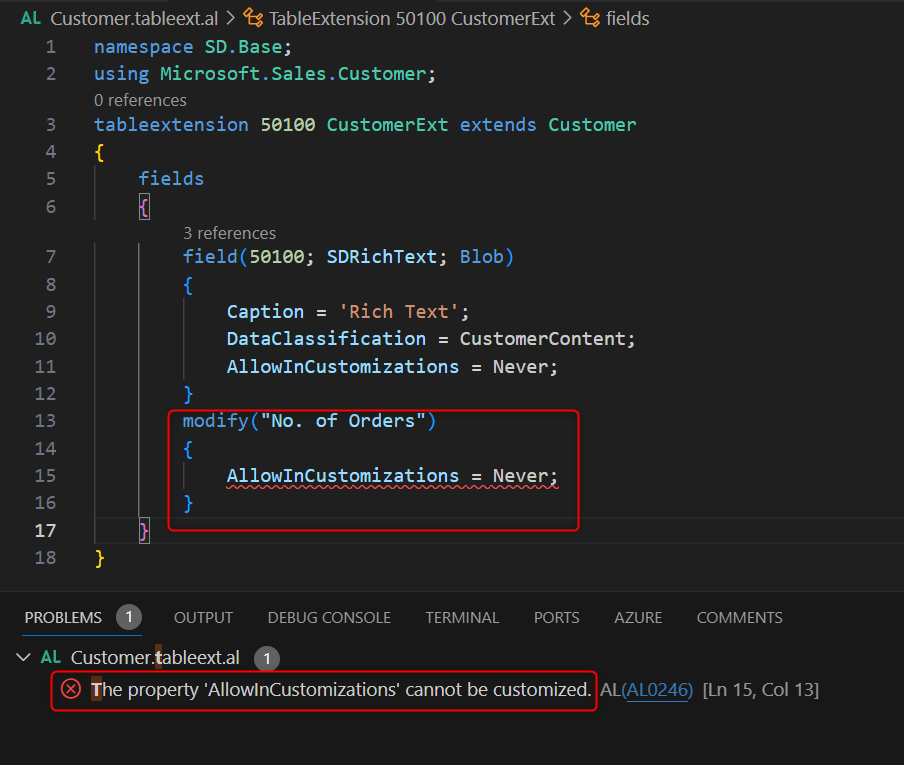
Remember also that the AllowInCustomization property can only be set by the owner of the table object (who defines that table). It cannot be changed via a tableextension object:
Wht this?
For the same reason as before: it’s the owner of the table that can define is a field can be exposed in the UI or not. Someone else (for data security reasons) cannot change this definition.

 Stefano Demiliani