


After yesterday’s post about scheduling Microsoft Dynamics NAV tasks in parallel with Powershell, I’ve received an interesting question: If I have a custom C# DLL that works with NAV (calls a NAV web service for example) can I also use this DLL on my script?
The answer is YES. In a Powershell script you can also embed your C# code or also use your external C# DLLs. Let’s see a quick example:

In this Powershell script, we’ve added a reference to an external C# DLL and then we’ve added a C# code (MyNAVSuperClass). I’ve created this sample class with two methods, one static and one not static.
After the C# class, the Add-Type Powershell command adds a reference to the external DLL (type):
 Then, the C# class is istantiated:

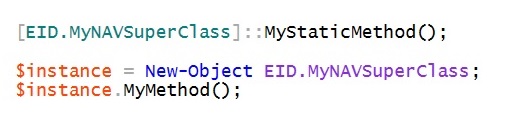
and now we call the C# methods from Powershell (here you can see how to call a static method and how to call a non-static method):
The complete script is as follows:
$Assem = (
 "EID.NavTools, Version=2.0.0.0, Culture=neutral, PublicKeyToken=73e9bde131e8729c"
 )

$code = @"
using System;
using EID.NavTools;

namespace EID
{
 public class MyNAVSuperClass
 {
   public static void MyStaticMethod()
   {
     EID.NavTools NAVTools = new EID.NavTools();
     NavTools.PerformNAVTask();
     Console.WriteLine("Working with NAV");
   }

   public void MyMethod()
   {
     Console.WriteLine("Working with NAV 2");
   }
  }
}
"@

Add-Type -ReferencedAssemblies $Assem -TypeDefinition $Source -Language CSharp

if (-not ([System.Management.Automation.PSTypeName]'EID.MyNAVSuperClass').Type)
{
 Add-Type -TypeDefinition $code -Language CSharp;
}

[EID.MyNAVSuperClass]::MyStaticMethod();

$instance = New-Object EID.MyNAVSuperClass;
$instance.MyMethod();

 Stefano Demiliani